
Seedance 2.5 vs Kling 2.6 for Ad Creative (2026)
Which model holds a product's label across a shot, which gives you usable audio, and what each one really costs per ad. Both are in the VIDEO AI ME picker.
If you buy media for a living, the Seedance 2.5 vs Kling question is not really about which model looks prettier in a highlight reel. It is about which one holds your product's shape and its label from the first frame to the last, which one gives you audio you can actually run, and what a usable ad ends up costing once you count the rejects. Both models sit in the same VIDEO AI ME model picker today, and they are good at genuinely different jobs.
We have run both against the same briefs: product hero cuts, UGC style hooks, and short scripted spots. What follows is the practical split, not a leaderboard.
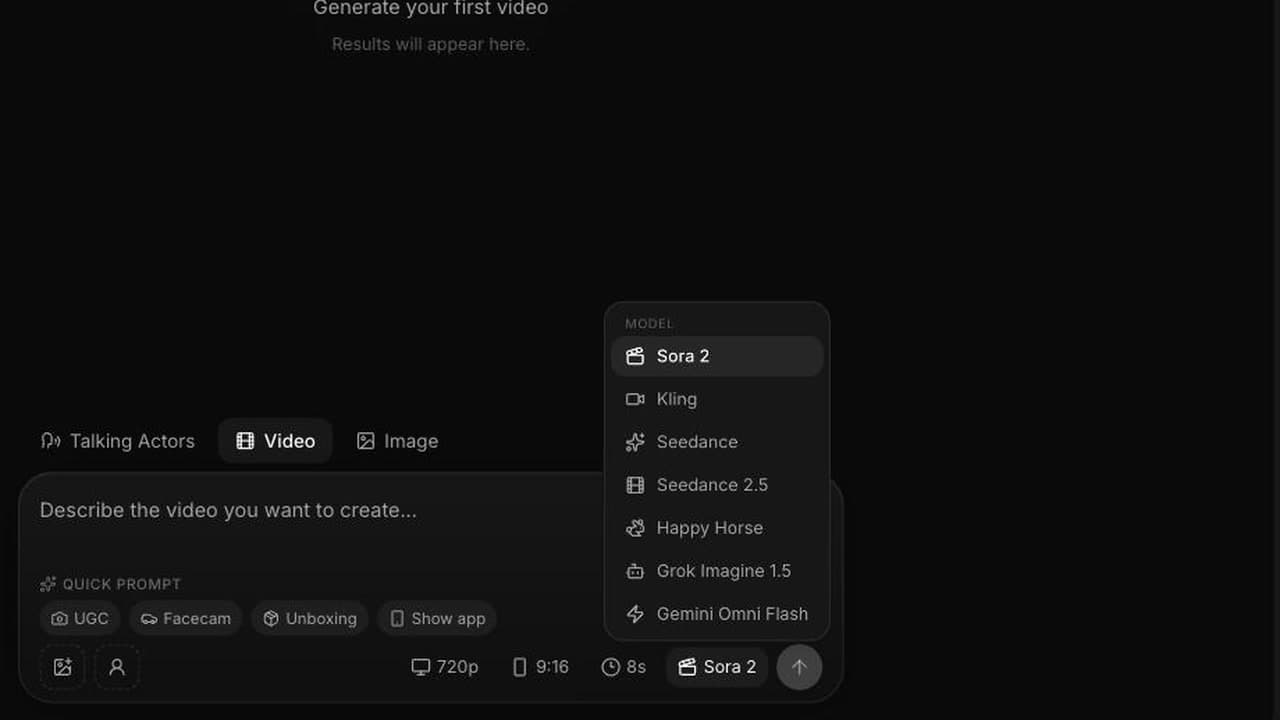
Seedance 2.5 vs Kling: what each model actually is in VIDEO AI ME
The two models are not built the same way, and that difference explains almost every result you will get from them.
Kling 2.6 in VIDEO AI ME is an image animator. You give it one image and a short prompt describing the motion, and it moves that image. Seedance 2.5, the newest video model from ByteDance Seed, is a full generator with three modes, chosen automatically by how many reference images you attach: none gives you text to video, one gives you image to video, and two to four gives you reference to video, where you bind each image to a role in the prompt using @Image1, @Image2 and so on.
| Seedance 2.5 | Kling 2.6 | |
|---|---|---|
| Input modes here | Text to video, image to video, reference to video with 2 to 4 images | Image to video from a single start image |
| Durations | 4, 8, 12, 15, 20, 25, 30 seconds | 5 or 10 seconds |
| Resolutions | 480p and 720p | 720p |
| Aspect ratios | auto, 21:9, 16:9, 4:3, 1:1, 3:4, 9:16 | 16:9 and 9:16 |
| Audio | Generated with the video: sound effects, ambient sound, lip synced speech | Not generated by the model; speech comes from a separate pass in the pipeline |
| Cost | 23 credits per second at 480p, 48 at 720p | 7 credits per second |
One credit is one cent of generation cost, so those last two rows are the whole economic story of this comparison. Kling is the cheapest video engine in the product, which is exactly why it powers the talking actor workflow, where you are generating a lot of takes and the speech is layered in by a dedicated step rather than by the video model.
Which one holds a product's shape and its label
This is the question that decides whether an ad is usable, and the honest answer is that the two models fail in different places.
Kling starts from your photograph. Frame one is your actual product, at your actual angle, with your actual label, because it is your file. Nothing is invented at the start. The risk is drift: over five or ten seconds of motion, edges soften, small text on packaging can smear, and a hand crossing the product can leave the label slightly rebuilt on the other side. Short moves protect you. If you keep the camera push slow and the subject roughly centred, a five second Kling clip of a bottle or a jar usually survives intact.
Seedance 2.5 in reference to video mode takes a different route. You attach a clean pack shot as @Image2, a creator photo as @Image1, and then write a shot that uses both. The model is reasoning about the whole clip at once rather than extrapolating frame by frame from a single start image, so identity tends to hold across a longer take, including when the product changes hands, moves out of frame and comes back, or gets held up to camera at a new angle. The failure mode here is blending: if your prompt says "the person holds the product" without binding the images, the model can merge attributes from both references. Naming them explicitly ("keep the creator from @Image1, the bottle and label from @Image2") is the difference between a usable asset and a strange hybrid.
The practical rule we use: if the ad is a slow, single move on a product you already photographed, Kling is fine and enormously cheaper. If the product has to be handled, shown at multiple angles, or carried across a cut, Seedance 2.5 in reference to video mode is the one that survives.
Motion, and what breaks it
Kling's motion is capable but bounded by its inputs. It has one frame of truth and it must invent everything after it, so ambitious motion is where it strains: fast camera orbits, multiple moving subjects, a person walking toward camera while gesturing. Ask it for a gentle dolly, a rotation, steam rising, fabric moving, and it holds up well. Our Kling prompt tips for cleaner motion go deeper on how to phrase that.
Seedance 2.5 handles more complex motion because it plans the shot as a whole. Written as one continuous description with a beginning, a middle and an end, it will carry a camera move through a change of subject. That also means it rewards a different prompt style. Keyword salad gets you an average of everything you typed. A shot written like a director's note gets you the shot.
Duration matters here too. Kling gives you five or ten seconds, which is one beat. Seedance 2.5 goes to thirty seconds in a single pass, which is enough for setup, development, a turn and a resolution inside one generation instead of stitching. If your ad concept has a reversal in it, that is not a small difference.
Audio: one model hands you a finished soundtrack
This is the cleanest split in the whole comparison.
Seedance 2.5 generates audio with the video, always, at no extra cost. There is no toggle and no surcharge. You get sound effects, ambient sound that matches the scene, and lip synced speech when you write dialogue in quotes. Because the audio is generated in the same pass as the picture, mouth movement and words line up in a way that a separate dubbing step rarely matches. For a sound on placement like TikTok, that is a real production shortcut: no voice casting, no separate voiceover session, no sync pass.
Kling does not produce that. It gives you motion. In VIDEO AI ME, speech for a Kling based talking actor is added by a dedicated lip sync step, which works well and is why the workflow exists, but it is a second stage with its own settings rather than something the video model decides. If your creative depends on ambient sound matching the scene, or on a spoken line delivered by a character the model invented, Seedance 2.5 is the shorter path.
Seedance 2.5 vs Kling on cost per usable ad
Here is where the honesty has to come in, because the price gap is large and it should change how you plan a month.
| Deliverable | Model | Credits | Plan credit value |
|---|---|---|---|
| 5 second product loop, 720p | Kling | 35 | about $0.35 |
| 10 second hero cut, 720p | Kling | 70 | about $0.70 |
| 8 second hook, 480p | Seedance 2.5 | 184 | about $1.84 |
| 8 second hook, 720p | Seedance 2.5 | 384 | about $3.84 |
| 15 second spot with dialogue, 720p | Seedance 2.5 | 720 | about $7.20 |
| 30 second spot, 720p | Seedance 2.5 | 1,440 | about $14.40 |
Kling at 7 credits per second is roughly a seventh of the cost of Seedance 2.5 at 720p for the same clip length. On a Pro plan with 5,600 monthly credits, that is about 80 ten second Kling clips, or about 14 eight second Seedance 2.5 clips at 720p. On Starter with 1,400 credits, it is about 20 Kling clips against three.
That ratio matters more than any quality argument if your process is "make forty variants, run them, keep the two that work." Cost per usable ad is cost per attempt divided by hit rate, and Kling's cost per attempt is low enough to absorb a much worse hit rate. What it cannot do is produce an ad you did not already photograph, or one that speaks.
So the real comparison is not model against model. It is: for this specific deliverable, is the asset something I can start from a photo, or something that has to be invented and has to talk?
A workflow that uses both
The teams getting the most out of the picker do not pick once. They split by job.
Use Kling for volume motion on assets you already own. Pack shots, lifestyle photos, existing UGC stills. Five second loops, ten second hero cuts, the twenty angle variations you need for a catalogue. This is where the price is doing the work.
Use Seedance 2.5 at 480p to explore concepts. At 23 credits per second, an eight second test is 184 credits. Generate the concept three or four ways, watch them, pick one.
Use Seedance 2.5 at 720p for the version you actually run. Once the concept, the dialogue and the timing are settled, render the winner at 720p. A 15 second spot is 720 credits. That is the number to compare against a shoot, not against another model.
Keep the reference workflow for anything with a person plus a product. Two to four images, each bound by name in the prompt, is how you keep a face and a label consistent across a whole shot.
If you are building this into a paid social process, our guide to Seedance 2.5 for TikTok UGC ads walks through the hook and pacing side, and our breakdown of the best AI video model for UGC ads and explainers covers how the rest of the field fits. For the older version of this same matchup, see Seedance 2.0 vs Kling, and for a full walkthrough of what changed in the new model, read our Seedance 2.5 review.
One more note for anyone running these on Meta: creative volume and creative quality are both levers, and Meta's own advertising guidance leans on testing multiple creatives per audience. Kling makes volume affordable. Seedance 2.5 makes the winners good. Using them in that order is cheaper than using either alone.
Frequently Asked Questions
Is Seedance 2.5 better than Kling 2.6 for ads?
For ads that need speech, ambient sound, or a scene that does not exist as a photograph yet, Seedance 2.5 is the better tool because it generates the picture and the audio together and runs to thirty seconds in one pass. For animating product photos you already own, Kling 2.6 does the job at a fraction of the cost. Neither wins outright, and most ad accounts end up using both.
How much cheaper is Kling than Seedance 2.5?
Kling costs 7 credits per second in VIDEO AI ME. Seedance 2.5 costs 23 credits per second at 480p and 48 credits per second at 720p. A ten second Kling clip at 720p is 70 credits against 480 credits for the same length on Seedance 2.5 at 720p, so Kling is roughly a seventh of the cost for equivalent runtime.
Which model keeps a product label readable?
Kling starts from your own photo, so the label is correct in frame one and the risk is drift during motion. Seedance 2.5 in reference to video mode holds a product across longer and more complex shots because you bind the pack shot to @Image2 and refer to it by name in the prompt. For short static moves, Kling is safe. For handling, angle changes and cuts, Seedance 2.5 is more reliable.
Does Kling generate audio like Seedance 2.5 does?
No. Seedance 2.5 generates sound effects, ambient sound and lip synced speech in the same pass as the video, always included in the price. Kling produces motion only. In VIDEO AI ME, speech on a Kling based talking actor is added by a separate lip sync step rather than by the video model itself.
Can I use both models in the same ad?
Yes, and it is usually the cheapest way to work. Animate the product photos you already have with Kling, generate the spoken or invented scenes with Seedance 2.5, and assemble them in the editor. Nothing stops you switching models between clips in the same project.
How many ads can I make per month on each model?
On the Pro plan with 5,600 monthly credits, that is roughly 80 ten second Kling clips at 720p, or roughly 14 eight second Seedance 2.5 clips at 720p, or about 7 fifteen second Seedance 2.5 spots. Starter includes 1,400 credits and Premium includes 12,000, and you can mix models freely within the same allowance.
Frequently Asked Questions
Share
AI Summary

Paul Grisel
Paul Grisel is the founder of VIDEOAI.ME, dedicated to empowering creators and entrepreneurs with innovative AI-powered video solutions.
@grsl_frReady to Create Professional AI Videos?
Join thousands of entrepreneurs and creators who use VIDEO AI ME to produce stunning videos in minutes, not hours.
- Create professional videos in under 5 minutes
- No video skills experience required, No camera needed
- Hyper-realistic actors that look and sound like real people
Get your first video in minutes
Related Articles
FLUX 3 Max Cinematic Video: 21:9 Brand Films at 1080p
How to shoot a cinematic brand film with FLUX 3 Max: 21:9 at 1080p, 20 second single takes, camera language, sound design, copy-paste prompts and a cost table per shot.

FLUX 3 Max Meta Ads: A Creative Testing Workflow
How to feed a Meta creative test with distinct FLUX 3 Max variants: credit budgets per asset, 720p drafts, 1080p winners, placement ratios and one-variable prompts.

FLUX 3 Max for Agencies: Client Volume and Cost per Ad
How agencies can price, draft and deliver client video with FLUX 3 Max: cost per deliverable, the 720p draft and 1080p final workflow, and keeping a batch on brand.