
Turn an Ad Script Into Video With Seedance 2.5
A working method for converting an ad script into a shot plan, then one prompt per beat, then a finished 15 second spot, with the credit cost of every step.
A script to video AI workflow only pays off if the script survives the trip. Most tools take an ad script, throw away the direction, and hand back a slideshow with a voice on top. Seedance 2.5 behaves differently in one specific way: picture and audio are generated in the same pass, so a line of dialogue arrives already attached to the shot it belongs to. This post walks one 15 second spot from written script to finished render on VIDEO AI ME, beat by beat, with the credit cost of every decision attached.
The spot is the one we built for the launch: a mock premium commercial that reveals itself as generated. If you want to see the finished piece first, read the full breakdown of the Super Bowl style spot and then come back for the method.
What script to video AI actually does with Seedance 2.5
Seedance 2.5 sits in the model picker in the VIDEO AI ME editor, next to Sora 2, Kling, Seedance 2.0 Fast, Happy Horse, Grok Imagine 1.5 and Gemini Omni Flash. Four properties of the model decide how you should write for it.
Audio is generated with the picture. Sound effects, ambient sound and lip synced speech come out of the same pass. There is no audio toggle and no audio surcharge, so dialogue belongs in the prompt rather than in a separate voiceover step.
The model reasons about the whole shot at once. A beat written as one continuous description with a beginning, a middle and an end holds together. A pile of comma separated keywords gives you a pile of comma separated ideas.
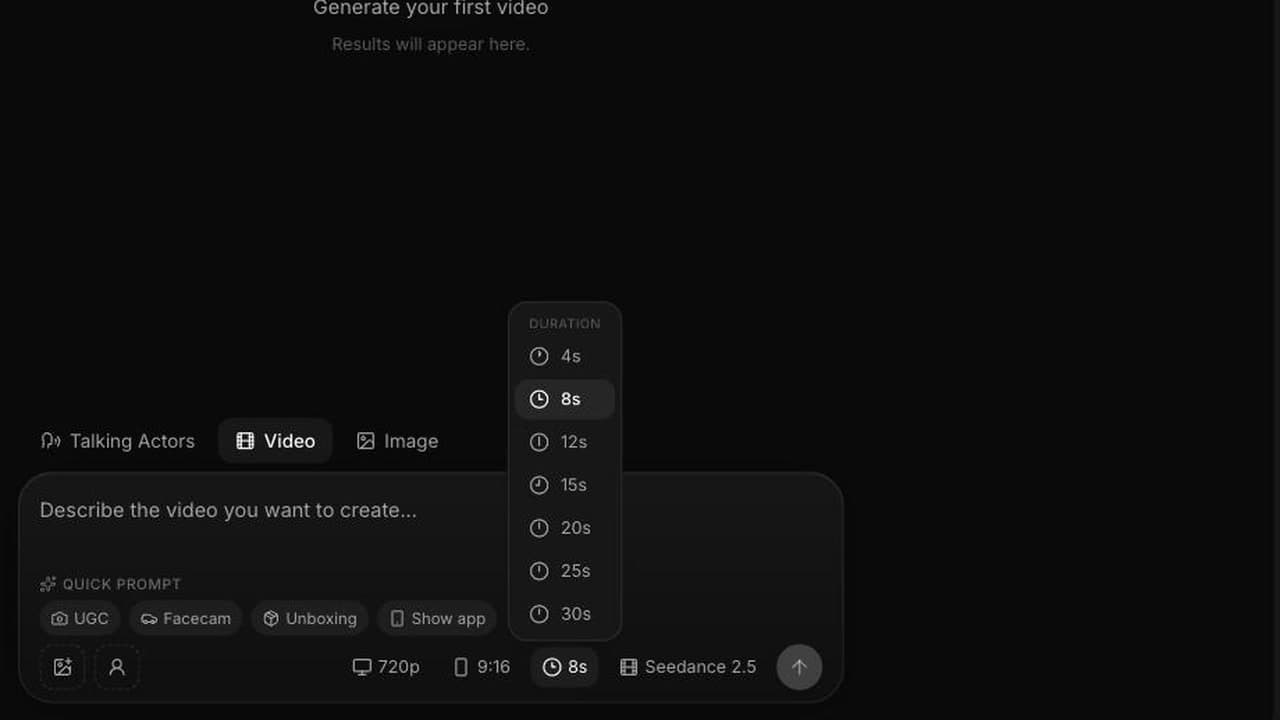
Duration is a choice. You can select 4, 8, 12, 15, 20, 25 or 30 seconds, and 30 seconds is generated in a single pass rather than stitched from shorter clips. That fact decides whether your script becomes a single render or six.
Two resolutions, seven aspect ratios. 480p and 720p; auto, 21:9, 16:9, 4:3, 1:1, 3:4 and 9:16. In image to video the clip follows the aspect of the image you attach, so the picker does not apply there.
Credits are the billing unit, and one credit is one cent of generation cost. Seedance 2.5 costs 23 credits per second at 480p and 48 credits per second at 720p. Every number below comes from those two rates.
The script: six beats in fifteen seconds
The concept is a luxury commercial that admits what it is. A woman in a crimson gown walks on a mirror calm ocean at sunset and says "They spent two million dollars on this ad." The world de-renders around her. Cut to a founder at a laptop at night: "They didn't. One prompt. No crew. No camera." Then a fast montage of the same actor in different looks and languages, then a brand card.
Written as a script that is four lines. Written as a shot plan it is six beats, and the shot plan is the thing you actually generate from.
| Beat | Length | What happens | What is heard |
|---|---|---|---|
| 1. Spectacle | 2.4s | Aerial orbit, woman in a crimson gown walks on a mirror calm ocean at sunset | Water, wind, no music |
| 2. The claim | 2.6s | She turns to camera | "They spent two million dollars on this ad." |
| 3. The reversal | 1.4s | The world de-renders around her | Sound falls away |
| 4. The reveal | 2.8s | Founder at a laptop at night, screen light on his face | "They didn't. One prompt. No crew. No camera." |
| 5. The montage | 2.8s | The same actor in different looks and languages, fast cuts | Snatches of speech |
| 6. The card | 3.0s | Brand card | A single tone |
Two things to copy here. First, every beat has a duration before anything is generated, because a 2.6 second beat cannot hold twenty words. Second, every beat has a sound column. If you leave audio blank in planning, you will leave it blank in the prompt, and the model will invent something, usually music.
How to turn one line of dialogue into one prompt
A prompt for Seedance 2.5 is a stage direction plus a soundtrack, written as prose. Six slots, in this order:
- Camera. Shot size, lens feel, movement, angle.
- Subject and action. Who, wearing what, doing what, with a beginning and an end.
- Setting and light. Where, what time, what the light is doing.
- Grade. Golden hour, teal and orange, muted contrast, halation, grain.
- Audio. Dialogue in quotes, ambient sound named, and an explicit note if you want no music.
- Format. Aspect ratio and the word photoreal if that is the look.
Here is beat 1 with the camera, subject, setting and grade slots filled:
Aerial drone orbit, 45 degree down angle, slowly descending, counter
clockwise. A woman in a flowing crimson silk gown walks barefoot on the
surface of a mirror calm ocean at golden hour, toward a low molten sun.
Slow concentric ripples radiate from each step. Slow motion, anamorphic
lens flare, teal and orange cinematic grade, rich blacks, gentle halation.
Epic luxury commercial style, 16:9, photoreal.
That prompt has no line in it yet. Beat 2 is where the dialogue lands, and the conversion is mechanical. Take the stage direction from your script, take the line, and write the audio slot last:
She slows, turns to camera and says, "They spent two million dollars on
this ad." Ambient: soft water movement under her feet, low wind. No music.
The pattern: a script line becomes a clause of the prompt, in quotation marks, attached to the person saying it and to a physical action. "She says" is weaker than "she slows, turns to camera and says", because the second version tells the model what the body is doing while the mouth moves.
A second conversion: stage direction to prompt
Beat 4 in the script reads:
INT. APARTMENT, NIGHT. A founder at a laptop, screen light on his face. He does not look up until the last word. "They didn't. One prompt. No crew. No camera."
Run it through the same six slots and you get:
Medium close up, 50mm, static with a slight handheld drift. A man in his
thirties sits at a laptop in a dark apartment at night, screen light on his
face, a single lamp behind him out of focus. He half smiles and says,
"They didn't. One prompt. No crew. No camera." Muted contrast, practical
light only, slight sensor grain. Ambient: laptop fan, distant traffic
through a window. No music. 16:9, photoreal.
Notice what changed between beat 1 and beat 4 without any extra instruction: the lens got longer, the grade got flatter, the ambient got smaller. That contrast is the joke of the spot, and it is carried entirely by prompt language. More patterns of this kind are collected in the Seedance 2.5 prompt guide.
One render or six? The assembly decision and what it costs
You have three honest options for a 15 second spot.
One pass. Write all six beats as one continuous 15 second direction, naming each transition ("hard cut to", "the world de-renders around her"). Cost at 720p: 15 seconds at 48 credits, or 720 credits, about $7.20 of plan credit per render. This gives the most coherent result because the model sees the whole arc, and the least control, because a single bad beat costs a full re-roll.
Six separate beats. The shortest selectable duration is 4 seconds, so six generations means 24 seconds of video for 15 seconds of usable footage. At 720p that is 1,152 credits, 432 more than the single pass. You get exact control of each beat and clean cut points, and you trim nine seconds onto the floor.
The split, which is what we use. Two renders of 8 seconds: beats 1 to 3 in one, beats 4 to 6 in the other. Sixteen seconds of generation, 768 credits at 720p, only 48 more than the single pass. When the dialogue in the second half misses you re-roll 384 credits instead of 720. Both clips land in your project and you trim the overlap on the timeline.
For scripts longer than this one, generate rather than stitch: 30 seconds comes out in a single pass, and the arc rules for that length are in 30 second Seedance 2.5 generations.
Rehearse at 480p, finish at 720p
The same 15 seconds at 480p costs 345 credits instead of 720. Blocking, timing, dialogue length and whether the line reads at all are all visible at 480p. Resolution is the last thing to buy.
A realistic budget for this spot: three 480p rehearsals at 345 credits each plus one 720p master at 720 credits, or 1,755 credits, about $17.55 of plan credit. Pro at $99 a month carries 5,600 credits, so three finished spots with change. Premium at $199 carries 12,000 credits, so six. Starter at $29 carries 1,400 credits, enough for one 720p master and one rehearsal, which is why brand film work at this length tends to start at Pro.
Where ad scripts break in script to video AI
Five failure modes, all of them fixable in the script rather than the render:
- Too many words per beat. Budget roughly two to three seconds per short spoken line. Beat 2 above is 2.6 seconds and carries eight words.
- Silence is not the default. If you do not write "no music", you may get a music bed you did not ask for and cannot separate.
- Unnamed transitions. In a single pass render, the model needs to be told how one beat becomes the next. Name the cut.
- Type and logos. Fine text on packaging and complex logos are the weakest part of generated video. Keep legal lines, pricing and the logo on a card you control instead of asking for them in frame.
- Aspect decided afterwards. Vertical placements on TikTok for Business and Meta want 9:16 originals, not a 16:9 render cropped later. Choose the ratio before you generate. If you are writing the hook itself rather than the spot around it, the tested video ad hook formulas are the faster place to start.
Seedance 2.5 comes from ByteDance's Seed research team, and it landed first in Chinese language consumer apps. On VIDEO AI ME it runs in English in the browser on a normal subscription, which is the practical reason most media buyers can use it at all right now.
Frequently Asked Questions
Can Seedance 2.5 turn a written ad script into video in one pass?
It can generate a scripted spot up to 30 seconds in a single pass, including the spoken lines, as long as the script is rewritten as continuous direction rather than a screenplay. What it does not do is read a formatted script file and split it into shots for you. That conversion, script to beats to prompts, is the work this post describes, and it takes about fifteen minutes for a 15 second spot.
How much does a 15 second ad cost to generate with Seedance 2.5?
At 720p, 15 seconds costs 720 credits, which is about $7.20 of plan credit, because Seedance 2.5 bills 48 credits per second at 720p and one credit is one cent. The same 15 seconds at 480p costs 345 credits. Audio is included in those numbers; there is no separate charge for speech, ambient sound or effects.
Should I generate one long clip or one clip per beat?
Generate in the largest chunk you can tolerate re-rolling. A single 15 second pass is the cheapest and the most coherent, but a failed beat costs the whole render. Splitting a 15 second spot into two 8 second halves costs 768 credits instead of 720 and cuts your re-roll cost almost in half. Six separate beats costs 1,152 credits at 720p because the minimum duration is 4 seconds.
Do I need to record a voiceover separately?
No. Speech is generated with the picture and lip synced, so you write the line into the prompt in quotation marks and it comes back spoken. This also means you should specify what you do not want: name the ambient sound you expect and write "no music" if the beat should be dry.
What aspect ratio should I generate an ad script in?
Choose it before you generate. Seedance 2.5 offers auto, 21:9, 16:9, 4:3, 1:1, 3:4 and 9:16, so produce 9:16 originals for vertical placements and 16:9 for YouTube and connected TV style cuts. The one exception is image to video, where the clip follows the aspect of the image you attached and the picker does not apply.
If most of your output is creator style ads rather than brand films, the AI UGC generator is the shorter path: same model, fewer beats, and prompts built around a person talking to a phone.
Frequently Asked Questions
Share
AI Summary

Paul Grisel
Paul Grisel is the founder of VIDEOAI.ME, dedicated to empowering creators and entrepreneurs with innovative AI-powered video solutions.
@grsl_frReady to Create Professional AI Videos?
Join thousands of entrepreneurs and creators who use VIDEO AI ME to produce stunning videos in minutes, not hours.
- Create professional videos in under 5 minutes
- No video skills experience required, No camera needed
- Hyper-realistic actors that look and sound like real people
Get your first video in minutes
Related Articles
FLUX 3 Max Cinematic Video: 21:9 Brand Films at 1080p
How to shoot a cinematic brand film with FLUX 3 Max: 21:9 at 1080p, 20 second single takes, camera language, sound design, copy-paste prompts and a cost table per shot.
FLUX 3 Max Meta Ads: A Creative Testing Workflow
How to feed a Meta creative test with distinct FLUX 3 Max variants: credit budgets per asset, 720p drafts, 1080p winners, placement ratios and one-variable prompts.
FLUX 3 Max for Agencies: Client Volume and Cost per Ad
How agencies can price, draft and deliver client video with FLUX 3 Max: cost per deliverable, the 720p draft and 1080p final workflow, and keeping a batch on brand.