
Seedance 2.5 Prompt Guide: Prompts That Work
Seedance 2.5 prompts work best as shot descriptions, not keyword lists. Prompt anatomy, a before and after rewrite, and six complete prompts with the modes and settings they were written for.
Seedance 2.5 prompts read more like a shot description handed to a director than a list of tags. The model plans the whole clip at once, including its audio, so a paragraph that names the subject, the camera move, the light and what should be heard beats a comma separated pile of keywords almost every time. This guide breaks a prompt into five parts, rewrites a weak one, and hands you four more complete prompts to paste into VIDEO AI ME.
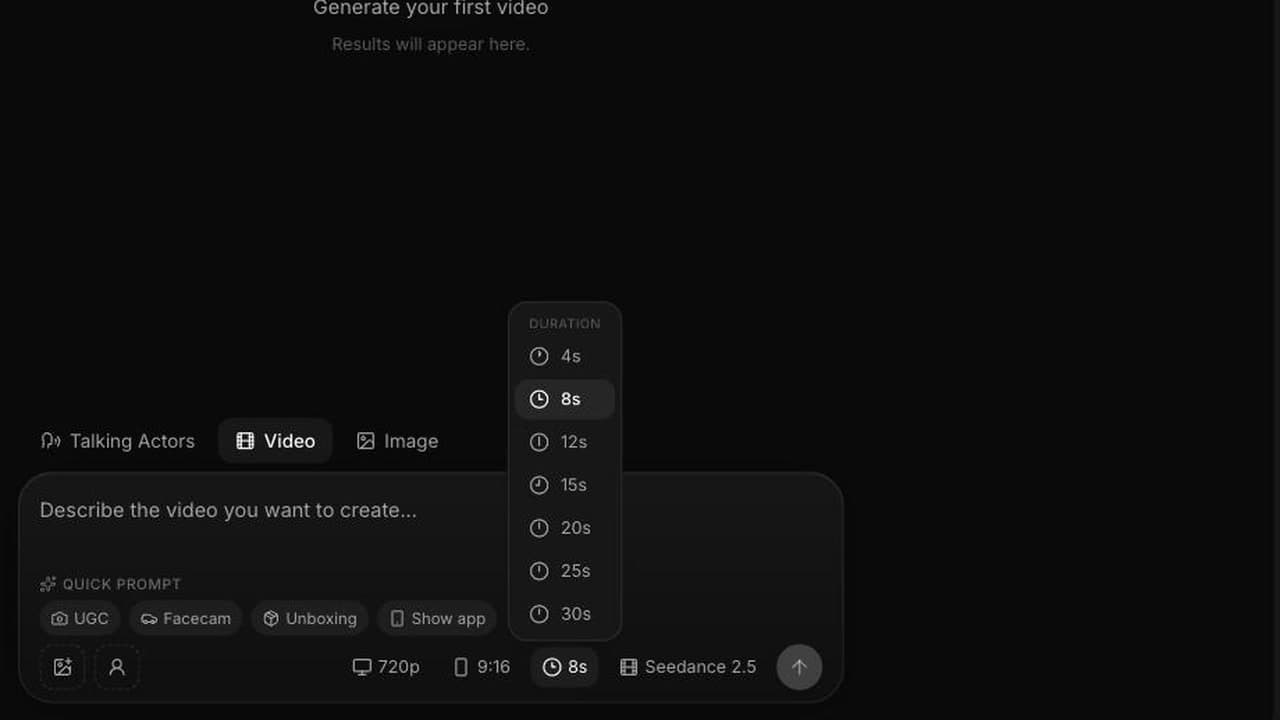
Seedance 2.5 is live in the model picker in the VIDEO AI ME editor on videoai.me, next to Sora 2, Kling, Seedance 2.0 Fast, Grok Imagine 1.5 and Gemini Omni Flash. You pick a duration of 4, 8, 12, 15, 20, 25 or 30 seconds, a resolution of 480p or 720p, and an aspect ratio. The mode picks itself from how many reference images you attach.
What makes Seedance 2.5 prompts different from keyword lists?
Older text to video models rewarded stacking modifiers, so you wrote "cinematic, 8k, ultra detailed, award winning" because those tokens nudged quality up and the model was not really reading your sentence. Seedance 2.5 reasons about the shot as a whole before it renders a frame, so quality adjectives now compete with information. A sentence saying where the camera is and what the subject does with their hands beats five words meaning "make it look expensive".
Three practical consequences follow:
- Write continuous prose. One paragraph with a beginning, a middle and an end. The model reads your sentence order as the event order.
- Write the sound. Audio is generated on every run, so silence and the absence of music are choices you state out loud. Say nothing and you get whatever the model thinks the scene sounds like.
- Write the finish, not the hype. "Anamorphic lens flare, teal and orange grade" is instruction. "Masterpiece, best quality" is noise.
The five parts of a working Seedance 2.5 prompt
Every prompt below follows this five part skeleton, in this order.
1. Subject and action
Name who or what is in frame, then a specific physical action with a start and an end. "A woman holding a coffee" is a photograph. "She lifts the cup with both hands, takes a short sip, sets it down and looks out of the window" is a shot. Actions with a clear finish stop the model producing four seconds of gentle swaying.
2. Camera language
Shot size, lens feel, angle, movement. "Static medium shot on a 50mm lens at eye level" behaves nothing like "slow dolly in from a wide, low angle, 24mm". Pick one move per shot. A crane, an orbit and a whip pan inside eight seconds gets you mush.
3. Lighting and grade
Time of day, direction of the key light, colour treatment. "Warm window light from camera left, soft shadows, neutral grade with slightly lifted blacks" gives the model something to solve. Grade language a colourist would recognise works: golden hour, teal and orange, soft halation, high key, hard sun.
4. Audio direction
Dialogue goes in quotes so the model treats it as speech to lip sync rather than description. Then the ambience, then the effects, then whether you want music. "Ambient sound of a milk steamer, low conversation and a door chime. No music." is a complete audio brief.
5. Format and finish
Aspect ratio and the look you are targeting: photoreal, documentary handheld, glossy commercial, stop motion. The shortest section, and the easiest to forget.
How the three modes change what you write
The mode is not a dropdown. It follows the number of reference images attached.
| Reference images attached | Mode | What your prompt has to carry |
|---|---|---|
| 0 | Text to video | Everything: subject, wardrobe, set, camera, light, audio. |
| 1 | Image to video | Motion, camera and audio only. The still fixes the look and the aspect ratio. |
| 2 to 4 | Reference to video | Bindings. Address each image as @Image1 through @Image4. |
In text to video you write a casting brief and a shot list at once, so it is the longest prompt of the three. In image to video, resist re-describing what the still already shows and spend the words on movement. In reference to video the failure mode is vagueness: "the person and the product" gets blended, "the creator from @Image1 holding the bottle from @Image2" does not. The reference image walkthrough covers the binding syntax in detail.
Before and after: rewriting a keyword soup prompt
A prompt in the old style. Not a strawman, just the shape most people paste in on day one.
beautiful woman, coffee shop, cinematic, 4k, ultra realistic, professional lighting, trending on artstation, high detail, smiling, holding coffee cup, bokeh, masterpiece
It renders something generic: no defined action, arbitrary framing, random audio, a face that drifts. The same idea rewritten for text to video, 8 seconds, 720p, 9:16:
A woman in her early thirties sits at a window seat in a small city coffee shop on a bright weekday morning. She lifts a ceramic cup with both hands, takes a short sip, sets it down on the saucer and glances out at the street with a small satisfied smile. Static medium shot on a 50mm lens at eye level, shallow depth of field, the pedestrians behind the glass softly out of focus. Warm natural window light from camera left, soft shadows, neutral grade with slightly lifted blacks. Ambient sound of a milk steamer, low background conversation and a door chime near the end. No music, no dialogue. Photoreal, 9:16.
Five things changed: the subject got an age and a place, the action got a beginning and an end, the camera got a position and a lens, the light got a direction, and the audio got an instruction including an explicit "no music". The word "cinematic" disappeared because every other sentence now does that job properly.
Four Seedance 2.5 prompts you can paste in today
Each is labelled with the mode and settings it was written for, priced at 23 credits per second at 480p and 48 at 720p.
1. Text to video, 8 seconds, 480p, 9:16. A cheap variant test at 184 credits.
A man in a navy work apron stands behind a small bakery counter at opening time, slides a tray of croissants into the display case, then straightens up and nods once at someone off camera. Handheld medium shot, slight natural sway, 35mm lens, eye level. Cool early morning light through a shopfront window, warm practical bulbs above the counter, natural grade. Ambient oven fan, paper bags, a distant street. No music. Documentary realism, 9:16.
2. Image to video, 8 seconds, 720p. A packshot brought to life at 384 credits.
The bottle stays exactly where it is while the camera arcs ninety degrees around it to the right, slowly, at product height. A soft highlight travels across the glass as the camera moves, and a thin ribbon of condensation runs down the label. Nothing else in the frame moves. Studio quiet, one soft glass ring at the moment the highlight peaks, no music, no voice.
3. Reference to video, 12 seconds, 480p, 9:16. Creator plus product at 276 credits.
Keep the woman from @Image1 exactly as she appears, same face, same hair, same grey sweatshirt. Keep the serum bottle from @Image2 exactly as it appears, same label and same cap. She sits on the edge of a bed in soft morning light, holds the bottle near her cheek, turns it so the label faces the lens, then presses two drops into her palm and looks down the barrel. Handheld selfie framing at arm's length, slight sway, 28mm feel. Natural window light, no grade, plain bedroom wall behind. She says, "I have used this every morning for three weeks." Room tone only, no music. 9:16, photoreal.
4. Text to video, 8 seconds, 720p, 16:9. Dialogue and lip sync at 384 credits.
A warehouse operations manager in a hi-vis vest stands in a wide aisle between racking, holding a tablet. She looks up and says to camera, "We used to lose two hours a day to this." She shrugs and goes back to the tablet. Static medium close up, 85mm lens, chest height, shallow depth of field with the racking falling away behind her. Overhead industrial lighting, cool neutral grade. Ambient warehouse hum and a distant forklift beep. No music. Photoreal, 16:9.
Do not run all four at 720p first. Test at 480p, keep what works, re-render only that at 720p. That habit is the difference between a plan that stretches and one that runs out in week two.
What the 15 second spot teaches about prompt length
We used Seedance 2.5 for a 15 second mock commercial that gives itself away on purpose. A woman in a crimson gown walks across a mirror calm ocean at sunset and says "They spent two million dollars on this ad." The world de-renders around her, we cut to a founder at a laptop at night with the line "They didn't. One prompt. No crew. No camera.", then a montage, then a brand card. Six beats in fifteen seconds. The first one:
Aerial drone orbit, 45 degree down angle, slowly descending, counter clockwise. A woman in a flowing crimson silk gown walks barefoot on the surface of a mirror calm ocean at golden hour, toward a low molten sun. Slow concentric ripples radiate from each step. Slow motion, anamorphic lens flare, teal and orange cinematic grade, rich blacks, gentle halation. Epic luxury commercial style, 16:9, photoreal.
Roughly sixty words for two and a half seconds of screen time, none of it padding. Every clause is a decision the model would otherwise make for you. The full breakdown of that spot walks through all six beats and what each cost, and the 30 second generation guide covers structuring an arc that runs longer than fifteen seconds.
What Seedance 2.5 prompts cost to iterate on
Credits are the billing unit on VIDEO AI ME and one credit is one cent of generation cost. Seedance 2.5 runs at 23 credits per second at 480p and 48 at 720p, audio included at both.
| Plan | Price | Monthly credits |
|---|---|---|
| Starter | $29/mo | 1,400 |
| Pro | $99/mo | 5,600 |
| Premium | $199/mo | 12,000 |
Pro buys about 243 seconds of 480p or 116 seconds of 720p a month. Premium buys about 521 seconds of 480p or 250 seconds of 720p. An active subscription is required for video generation. Coming from the previous model, the Seedance 2.0 prompt guide still holds there and most habits transfer, but audio direction and continuous prose are new here. For finished prompts organised by scenario, see the Seedance 2.5 prompt library.
Two outside references worth reading alongside this: model level research notes from ByteDance Seed, and the creative specs at TikTok for Business and Meta for Business, which tell you which aspect ratio to set before you generate rather than after.
Frequently Asked Questions
How long should a Seedance 2.5 prompt be?
Aim for 50 to 120 words for a single shot, and more for longer durations with several beats. Length is not the point, information is. If a sentence tells the model nothing about the subject, action, camera, light, sound or format, it is not earning its place.
Do I have to write the audio into the prompt?
You do not have to, but you should. Audio is generated with every clip and there is no toggle to turn it off, so an unspecified soundtrack is still a soundtrack. Write dialogue in quotes, name the ambience, and add "no music" when you want the clip clean enough to drop your own track over.
Should I test prompts at 480p or 720p?
Test at 480p. At 23 credits per second an 8 second variant costs 184 credits against 384 credits at 720p, and composition, timing, motion and lip sync are all judgeable at the lower resolution. Re-render only the keeper at 720p.
Does Seedance 2.5 respect negative instructions like "no music"?
In our runs, explicit negatives inside the prose work better than a separate list of banned words. Write them into the audio or scene direction in plain language: "no music", "no dialogue", "nothing else in the frame moves". Keep to the two or three that matter most.
Why did my prompt produce a different scene from the one I described?
Almost always because the prompt described a state rather than an action, or contained two competing camera moves. Give the subject one physical action with a clear end, give the camera one move, and put events in the order you want them on screen.
Can I reuse my Seedance 2.0 prompts in Seedance 2.5?
Yes, and they generally improve, because the newer model reads full sentences more faithfully. Add two things before re-running: an audio line, and a stronger sense of sequence, since Seedance 2.5 will carry a beginning, a middle and an end inside one generation.
Frequently Asked Questions
Share
AI Summary

Paul Grisel
Paul Grisel is the founder of VIDEOAI.ME, dedicated to empowering creators and entrepreneurs with innovative AI-powered video solutions.
@grsl_frReady to Create Professional AI Videos?
Join thousands of entrepreneurs and creators who use VIDEO AI ME to produce stunning videos in minutes, not hours.
- Create professional videos in under 5 minutes
- No video skills experience required, No camera needed
- Hyper-realistic actors that look and sound like real people
Get your first video in minutes
Related Articles
FLUX 3 Max Audio: Sound and Dialogue Prompt Guide
FLUX 3 Max generates sound on every clip. How to write dialogue it will speak, direct ambience and effects, decide on music, and replace the track when you need to.
FLUX 3 Max Aspect Ratios and Durations Explained
Every FLUX 3 Max aspect ratio and clip length on VIDEO AI ME, how auto behaves in each mode, which placement wants which shape, and what each duration costs.
FLUX 3 Max 1080p vs 720p: When 1080p Is Worth It
FLUX 3 Max costs 17 credits per second at 720p and 29 at 1080p. When the higher tier earns its rate, when 720p is enough, and how to test cheap and deliver sharp.