
How to Make AI UGC Videos With Seedance 2.5
A five step playbook for creator style UGC clips with Seedance 2.5: casting, prompts that carry the spoken hook, reference images for batches, and the credit math.
The tell in bad AI UGC is almost never the face. It is the production. Clean key light, a centred subject, a camera that never moves, and a voice that sounds like it read the brand deck. This is the AI UGC Seedance 2.5 playbook we use on VIDEO AI ME: five steps from an empty prompt box to a batch of clips that read as a person filming in their own kitchen, with the credit cost of each step attached. Seedance 2.5 generates speech, ambient sound and picture in one pass, which is the part that makes creator style hooks possible without a separate voiceover.
Here is the same UGC brief run through both Seedance 2.5 and Seedance 2.0, side by side, so the version difference is visible on exactly this kind of clip.
Both models keep what the brief asks for: the gym bench, the propped phone angle, the product staged in frame, the straight to camera delivery, and no music or captions. The difference lands on the closing beat. The brief asks the creator to lift the pouch to camera for the last line, and the 2.5 render does it while the 2.0 render leaves the pouch on the bench and gestures instead, which costs you the one frame where the product is the hero. The wardrobe call goes the other way, the brief specifies a black t-shirt and 2.0 follows it while 2.5 puts him in cream. Prompt adherence differs beat by beat, so test your own script on both rather than assuming the newer model wins every line.
What makes AI UGC with Seedance 2.5 read as authentic
Before the steps, the checklist. A clip reads as creator content when it has most of these, and reads as an ad when it does not.
| Reads as UGC | Reads as an ad |
|---|---|
| Handheld framing, small drift, occasional reframe | Locked tripod, perfectly centred |
| A real room with clutter in it | Seamless backdrop or studio white |
| Window light, mixed colour temperature | Even key and fill, no shadows |
| Delivery with a stumble or a restart | Polished, evenly paced read |
| Room tone, traffic, a fridge hum | Music bed under everything |
| Product held badly, half in frame | Product presented at hero angle |
Every row on the left is something you can write into a prompt. That is the whole trick. The model will happily give you a studio commercial if you do not tell it otherwise, because most video described as "product video" looks like that.
Step 1: Cast the creator and the room before you write a word
Decide four things and keep them fixed for the whole batch: who the creator is, how old they are, what room they are in, and what time of day it is. Write them down. "Woman, early thirties, tired, small tiled bathroom, morning window light" is a casting brief you can reuse across ten prompts without drifting.
The room matters more than the person. A believable creator in a studio still reads as an ad. An ordinary looking person in a real bathroom at 7am reads as UGC even when the delivery is imperfect.
While you are here, decide the format: 9:16, and 8 seconds for a hook test. Seedance 2.5 offers 4, 8, 12, 15, 20, 25 and 30 seconds, and aspect ratios auto, 21:9, 16:9, 4:3, 1:1, 3:4 and 9:16. For UGC you will spend most of your credits at 8 seconds in 9:16.
Step 2: Write the prompt so the audio carries the hook
Because audio is generated with the picture and included in the price, the first line spoken is your hook. You do not need an overlay to carry it. Write the line in quotation marks, name the ambient sound, and say "no music" if you do not want a bed under it.
A complete prompt for a skincare hook:
Handheld vertical phone video, arm's length selfie, slight wobble and one
small reframe. A woman in her early thirties with no makeup stands in a
small tiled bathroom in morning window light, hair tied back, holding a
white serum bottle just below her chin. She glances at the bottle, then
back to camera and says, "I stopped using three products for this one and
my skin got less angry." Slightly overexposed window behind her, mixed
colour temperature, phone camera look, mild compression. Ambient: tap
water dripping, faint street noise. No music. 9:16.
A complete prompt for a kitchen gadget, same structure, different casting:
Handheld vertical phone video, propped on a counter, static with small
vibrations. A man in his late twenties in a hoodie stands in a cluttered
kitchen at night under warm overhead light, dishes visible behind him. He
picks up a small matte black coffee grinder, turns it once in his hand and
says, "Forty seconds. That is the entire routine now." He presses the top
and it whirrs. Phone camera look, slight motion blur, no colour grading.
Ambient: grinder motor, a fridge hum, a spoon on ceramic. No music. 9:16.
Three habits are doing the work in both prompts: the camera is described as a phone rather than a camera, the room is described with something wrong in it, and the line is attached to a physical action. More templates in this shape are in the Seedance 2.5 UGC prompt templates.
Step 3: Lock the creator and product across the batch with reference images
One creator saying one line is a test. A batch of clips with the same creator and the same product is a campaign. Reference images are how you get the second one.
The mode is chosen by how many images you attach. Attach none and you are in text to video. Attach one and Seedance 2.5 animates that image as the start frame. Attach two to four and you are in reference to video, where the images are addressed in the prompt as @Image1, @Image2, @Image3 and @Image4.
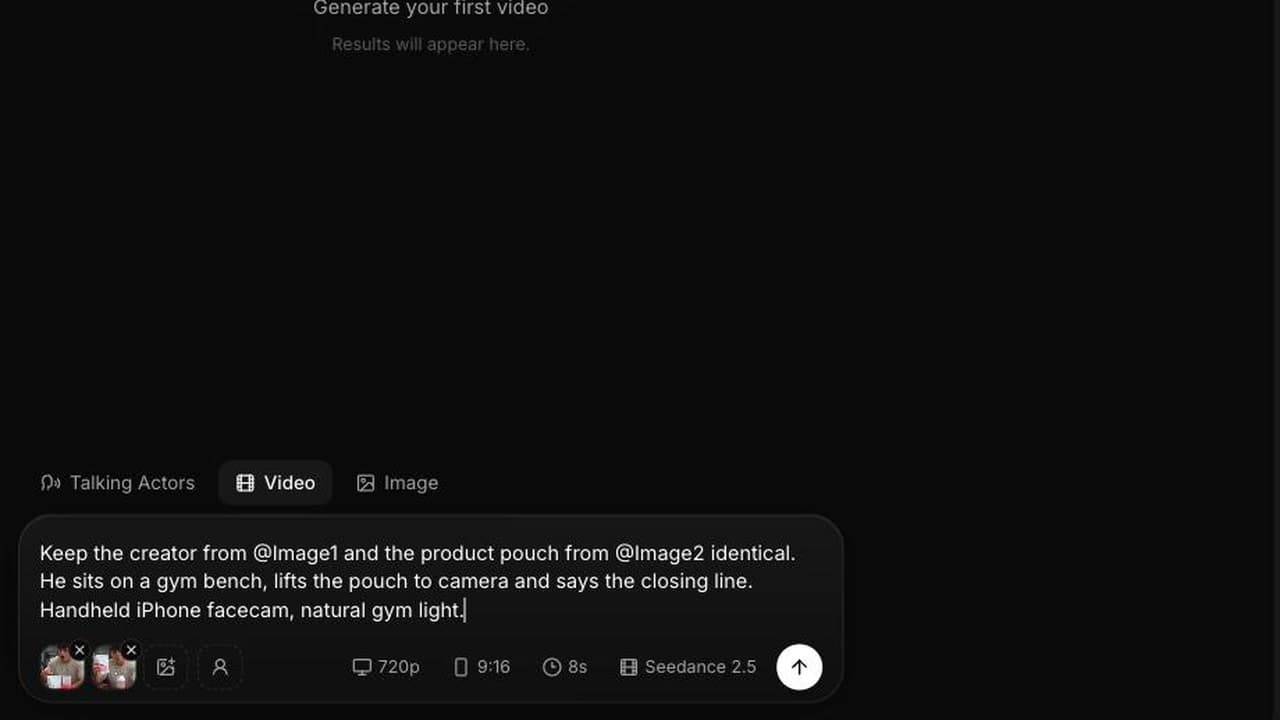
Bind each image explicitly. Vague references get blended, which is how you end up with a bottle wearing a hoodie:
Keep the creator from @Image1, same face, same hair, same hoodie. Keep the
product exactly as in @Image2, same label and same matte black finish.
Handheld vertical phone video in a cluttered kitchen at night. She holds
the product up beside her face, laughs once and says, "Third week. I am
not going back." Phone camera look, warm overhead light. Ambient: kitchen
room tone, a distant TV. No music. 9:16.
For a product batch, use a clean packshot as one reference and a photo of your creator as the other, then vary only the spoken line between runs. That gives you five hooks with one creator and one product instead of five unrelated clips. The mechanics of the mode are covered in more depth in the reference images guide.
Step 4: Test at 480p, then finish the winner at 720p
Seedance 2.5 runs at 480p and 720p. Credits are the billing unit, one credit is one cent, and the rates are 23 credits per second at 480p and 48 credits per second at 720p.
That means an 8 second UGC clip costs 184 credits at 480p, about $1.84, and 384 credits at 720p, about $3.84. Everything you need to judge a hook is visible at 480p: whether the line lands, whether the room reads as real, whether the lip sync holds, whether the product survives.
A sensible batch: six hooks at 8 seconds and 480p is 1,104 credits, then one winner re-run at 720p for 384. That is 1,488 credits, about $14.88, for one finished creative and five rejected ones you learned from.
Step 5: Kill the clips that read as an ad
Watch each test with sound on, on a phone, at the size it will actually run. Then cut anything with a music bed you did not ask for, anything where the creator's eyeline drifts off the lens through the whole clip, anything where the product label goes soft in the first two seconds, and anything where the delivery is too smooth to be a person talking to themselves.
Re-roll the survivors with one change each rather than a rewritten prompt. Change the line, or the room, or the time of day, never all three, or you will not know what fixed it.
What AI UGC with Seedance 2.5 costs per usable clip
Plans carry a monthly credit allowance: Starter is $29 a month for 1,400 credits, Pro is $99 for 5,600, Premium is $199 for 12,000. Against the 1,488 credit batch above that is roughly one finished creative per month on Starter, three on Pro, and eight on Premium, with the rejected tests included in the cost.
There is no free tier for video generation, so the honest comparison is not against zero. It is against what one creator brief, one shipped sample and one round of revisions costs you today, and against the other AI UGC generators you are already paying for. What changed with this model is that the spoken hook comes out of the same pass as the picture, so you are not paying twice and not fixing lip sync by hand. The Seedance 2.0 UGC workflow is still worth reading for structure; the audio step in it is the part 2.5 removes.
One more thing worth doing properly: platforms expect you to label realistic AI generated content. TikTok for Business and Meta both publish rules on synthetic media in ads, and the disclosure toggle costs you nothing in performance compared to getting an account flagged.
Frequently Asked Questions
What makes an AI UGC clip look like real creator content?
Handheld framing with a little drift, a real room with clutter in it, natural or mixed light, an imperfect delivery, room tone instead of music, and a product held the way a person holds it rather than at a hero angle. All six of those are prompt instructions. If you leave them out, the model defaults to a polished commercial, because that is what most footage described as product video looks like.
Can Seedance 2.5 generate the spoken hook, or do I add a voiceover?
It generates the speech, lip synced, in the same pass as the picture, along with ambient sound and effects. There is no audio toggle and no audio surcharge on VIDEO AI ME. Write the hook in quotation marks inside the prompt, name the ambient sound you want behind it, and add "no music" if you do not want a bed.
How do I keep the same creator across a batch of UGC clips?
Attach two to four reference images and address them in the prompt as @Image1 through @Image4, binding each one explicitly: keep the creator from @Image1, keep the product exactly as in @Image2. Attaching two or more images puts the generation into reference to video mode automatically. Vary only the spoken line between runs and the creator stays recognisable across the batch.
How long should an AI UGC clip be?
Eight seconds is the working default for a hook test, which is also the cheapest useful length: 184 credits at 480p. Move to 12 or 15 seconds when the clip has to carry a demonstration as well as a claim. Longer than that, you are making an ad rather than UGC, and the beat planning matters more than the casting.
How much does a batch of AI UGC clips cost on VIDEO AI ME?
Six 8 second tests at 480p cost 1,104 credits and one 720p finish costs 384, so about 1,488 credits or $14.88 per finished creative including the rejects. Starter at $29 a month carries 1,400 credits, Pro at $99 carries 5,600, and Premium at $199 carries 12,000, which works out to roughly one, three and eight finished creatives a month at that batch size.
Do I need my own product photos to make AI UGC?
Not for a text to video test, but you do for anything you will run as an ad. A flat packshot with the label readable is enough for one reference image, and a photo of the creator or a previous generated frame covers the other. Without a product reference the model will invent packaging, and invented packaging is fine for testing hooks and useless for selling the actual item.
Ready to run the batch? The AI UGC generator is where these prompts live on VIDEO AI ME, and the TikTok specific playbook covers the first two seconds in more detail.
Frequently Asked Questions
Share
AI Summary

Paul Grisel
Paul Grisel is the founder of VIDEOAI.ME, dedicated to empowering creators and entrepreneurs with innovative AI-powered video solutions.
@grsl_frReady to Create Professional AI Videos?
Join thousands of entrepreneurs and creators who use VIDEO AI ME to produce stunning videos in minutes, not hours.
- Create professional videos in under 5 minutes
- No video skills experience required, No camera needed
- Hyper-realistic actors that look and sound like real people
Get your first video in minutes
Related Articles

FLUX 3 Max UGC Ads: Workflow, Prompts and Costs
A practical workflow for creator-style UGC ads with FLUX 3 Max: the four-part prompt, the hooks worth testing, the checks before launch and the real cost per finished ad.
FLUX 3 Max UGC Prompts: 5 Fill-In-the-Blank Templates
Five 9:16 FLUX 3 Max UGC prompt templates (testimonial, unboxing, product in hand, problem-solution and street style), each with a filled example and its credit cost.
MiniMax H3 UGC Prompt Templates for Ad Creative
Reusable UGC prompt templates with the variables marked, so you can produce a whole batch of creator style ads by swapping four fields.