
Seedance 2.5 vs Seedance 2.0: What Changed
One 15 second script, two versions of the model, side by side. What changed in duration, audio, references, realism and cost per second, and when 2.0 is still the right call.
The fastest way to settle Seedance 2.5 vs 2.0 is to give both models the same script and watch them at the same time. That is exactly what the render below is: one 15 second spot, two engines, stacked. Seedance 2.5 runs in the top panel, Seedance 2.0 in the bottom, same prompt, same beats, no retouching on either.
Watch it twice. The first pass, follow the story: the spot opens on a woman walking on a mirror calm ocean at sunset, cuts to a founder at a laptop, and ends on the brand card. The second pass, ignore the story and watch one thing at a time. The fabric. Her face when the camera moves. What happens on the cut between the two worlds. That is where the version gap lives, and none of it shows up in a spec sheet.
Seedance 2.5 vs 2.0: The Short Answer
Seedance 2.0 Fast is a cheap, quick shot generator. Seedance 2.5 is a scene generator that costs about twice as much per second and gives you length, sound and consistency in return. Neither one replaces the other in a working ad pipeline. Most of the teams we would advise end up running both: 2.0 Fast for the wide testing round, 2.5 for the version that gets media spend behind it.
| Seedance 2.0 Fast | Seedance 2.5 | |
|---|---|---|
| Built for | Short single shots, fast iteration | Scenes with structure, up to 30 seconds |
| Length on VIDEO AI ME | Short clip durations | 4, 8, 12, 15, 20, 25 or 30 seconds, 30 in one pass |
| Audio | Generated audio, covered in our 2.0 audio guide | Sound effects, ambient and lip synced speech, always on, always included |
| References | Image conditioning | Up to 4 images, addressed as @Image1 to @Image4 |
| Resolutions | 480p, 720p | 480p, 720p |
| 480p cost | 11 credits per second | 23 credits per second |
| 720p cost | 25 credits per second | 48 credits per second |
| Best at | Volume, variants, cheap structural tests | Finals, dialogue, continuity across a cut |
If you have not met the older model, our Seedance 2.0 explainer is the background, and the Seedance 2.0 review is the hands on version.
Duration: The Difference That Changes Your Edit
This is the biggest functional change and it is easy to underrate until you have felt it.
Seedance 2.0 is a short form model. You write a moment, you get a moment, and if you need thirty seconds you produce several clips and join them in an editor. Everyone who has done that knows the tax: the shirt shifts a shade between clips, the light moves, the background gains a lamp that was not there before. You spend the afternoon hiding the seams with cuts and whip pans.
Seedance 2.5 reasons about the entire duration at once. On VIDEO AI ME you pick 4, 8, 12, 15, 20, 25 or 30 seconds, and a 30 second selection is generated in one pass, not stitched. The model knows at second two what has to be true at second twenty eight. In our runs that showed up as continuity through scene changes: a subject leaves frame in one world and reappears in another with the same face and the same wardrobe.
The prompting consequence is real. A prompt that works at eight seconds describes a moment. A prompt that works at thirty seconds describes a small story with a setup, a development, a turn and a resolution, with the transitions named. Feed a 2.0 style prompt into a 30 second generation and you get an expensive shot of not very much. The Seedance 2.5 walkthrough covers how to set that up in the editor.
Audio: From a Feature to a Default
Seedance 2.0 has generated audio, and we wrote about how it behaves in the Seedance 2.0 audio guide. In 2.5 audio stops being a thing you think about. It is always generated, always included in the price, and it arrives in three layers: lip synced dialogue for anything you wrote in quotes, sound effects tied to what happens on screen, and an ambient bed matched to the space.
For ad production, that collapses two steps. In the spot above, both spoken lines were written into the prompt and came back in the take, on the mouth, without a voiceover session or a sync pass. If you produce dialogue driven UGC, this alone is the reason to move.
One practical warning that applies to both versions: if you do not want music, say so in the prompt. Left open, the model will usually add a bed, and stripping it later is not possible without regenerating.
Reference Workflow: Vague Versus Bound
Both models take images. The difference is how precisely you can tell the model what to do with them.
On VIDEO AI ME, the Seedance 2.5 mode is picked automatically by how many images you attach: none gives you text to video, one gives you image to video with that image as the start frame, and two to four gives you reference to video. In reference to video you address each image in the prompt by name, @Image1 through @Image4, and bind it to a job: "keep the creator from @Image1, the bottle from @Image2, kitchen counter, morning light".
That explicit binding is what makes a spokesperson reusable across a campaign instead of merely consistent inside one clip. It is also the most common place people go wrong. Write "the person and the product" and the model blends features. Name the images every time.
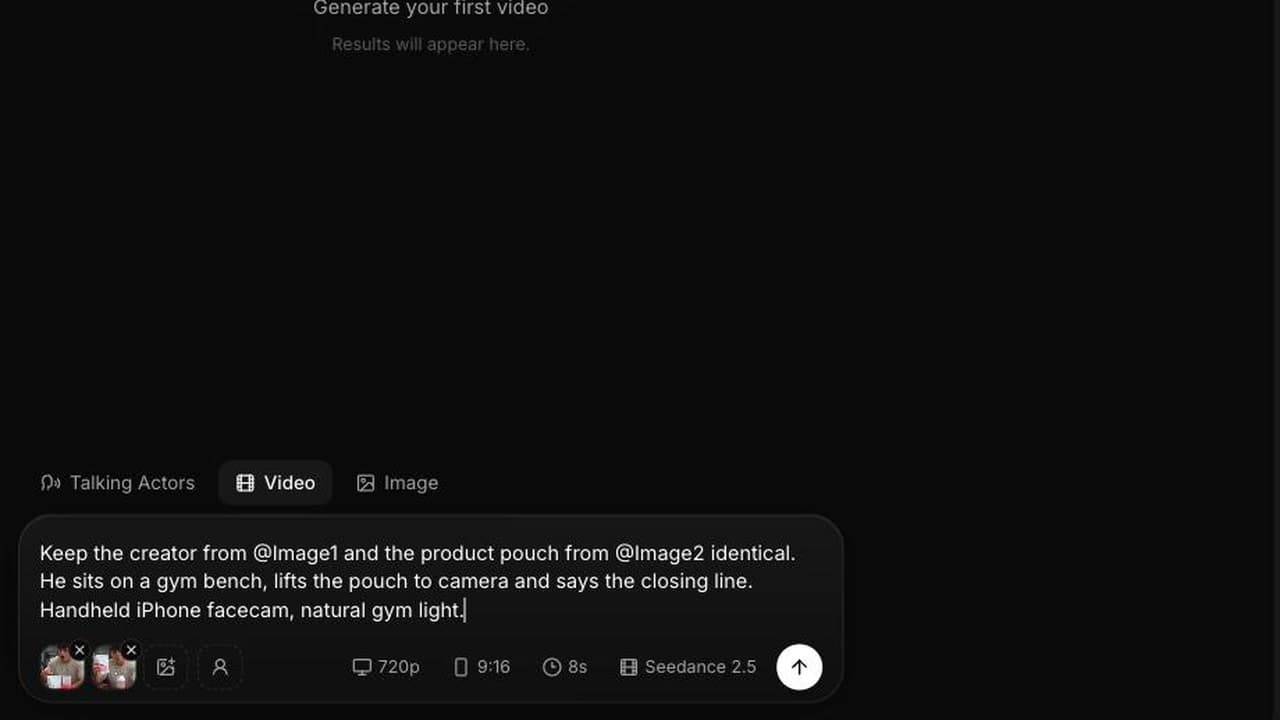
For completeness, the Seedance 2.5 model as ByteDance describes it also accepts video references and audio references and a larger number of reference images. On VIDEO AI ME today you get text to video, image to video, and reference to video with up to four images. Plan around that list. ByteDance's Seed team publishes its own research index at seed.bytedance.com.
Realism: What Is Actually Visible in the Render
We are not going to quote a realism score, because there is no honest number to quote. What we can do is tell you where to look in the comparison video at the top of this page.
Materials. The crimson gown in the 2.5 panel holds a weave and a drape through the camera move. Cheaper generations tend to flatten fabric into a painted surface once the light gets strong.
Skin and eyes. Under a low sun, the 2.5 face keeps texture rather than smoothing into wax, and the eyes hold a catchlight through the orbit. Eyes are the single detail most likely to break the illusion, and they are the first thing a media buyer's audience notices without being able to name it.
Light. A low sun blooms and halates the way an anamorphic lens does, and reflections land in plausible places on the water.
None of this means 2.0 output is unusable. It means that when you put the two next to each other in the same grade, the 2.5 panel survives a second viewing better. For an ad that will be seen once in a feed, that gap may not be worth double the credits. For a hero asset that runs for a quarter, it usually is.
Seedance 2.5 vs 2.0 on Cost Per Second
Credits are the billing unit and one credit is one cent of generation cost.
| Clip | 2.0 Fast at 480p | 2.0 Fast at 720p | 2.5 at 480p | 2.5 at 720p |
|---|---|---|---|---|
| 8 seconds | 88 credits | 200 credits | 184 credits | 384 credits |
| 15 seconds | 165 credits | 375 credits | 345 credits | 720 credits |
Seedance 2.0 Fast is the better value for cheap volume testing, and we would not pretend otherwise. At 11 credits per second at 480p you can run twenty structural variants of a hook for 1,760 credits and still have most of a Pro month left. The same twenty variants on 2.5 at 720p would be 5,760 credits. If your job today is finding out which of six openings holds attention, the older model is the correct instrument and the newer one is a waste of budget.
Where that flips is the moment the clip has to talk, run long, or hold a face. Then 2.5 is not more expensive than 2.0, it is cheaper than the alternative, because the alternative is a voiceover pass, a stitching pass and a continuity fix.
Plans: Starter is $29 a month with 1,400 credits, Pro is $99 with 5,600, Premium is $199 with 12,000. One ceiling to know: a 30 second 720p clip on 2.5 costs 1,440 credits, more than the entire Starter allowance, so 30 second 720p work starts at Pro. Starter handles 30 second 480p clips at 690 credits each. The full table is in our Seedance 2.5 pricing breakdown, and video generation requires an active subscription.
The Same Test on a UGC Brief
The spot above is a produced commercial. Most people reading this ship creator style ads instead, so here is the same experiment on a UGC brief: one prompt, both models, side by side.
Both keep the gym bench, the propped phone angle, the product staged in frame and the straight to camera delivery, and neither adds music or captions. The version gap shows up on the closing beat, where the brief asks for the product lifted to camera. Seedance 2.5 does it. Seedance 2.0 leaves the pouch on the bench and gestures instead. The wardrobe instruction goes the other way, a black t-shirt is specified and 2.0 renders it while 2.5 puts him in cream. Neither model wins every line, which is the argument for testing your actual script on both rather than switching wholesale.
How We Would Run Both
The workflow that wastes the least money looks like this. Write the structure, then test it on 2.0 Fast at 480p until the beats work. Move the winning structure to Seedance 2.5 at 480p to check that the dialogue, the audio and the references behave. Only then re-render at 720p for the version you put spend behind. One prompt, three passes, and you only pay the high per second rate on the take you are actually going to run. Whatever you upload, check it against the current placement specs on TikTok for Business before you launch.
Our full hands on notes on the newer model are in the Seedance 2.5 review.
Frequently Asked Questions
What is the main difference between Seedance 2.5 and 2.0?
Length and sound. Seedance 2.5 generates up to 30 seconds in a single pass with lip synced dialogue, ambient sound and effects always included, and it holds subjects consistent across scene changes. Seedance 2.0 is a short form shot generator that costs about half as much per second.
Is Seedance 2.5 twice as expensive as Seedance 2.0?
Close to it. Seedance 2.0 Fast is 11 credits per second at 480p and 25 at 720p. Seedance 2.5 is 23 at 480p and 48 at 720p. One credit equals one cent of generation cost, and audio is included in the Seedance 2.5 rate.
Should I still use Seedance 2.0 for anything?
Yes, for volume. Cheap structural testing of hooks and variants is where 2.0 Fast at 480p earns its place, since you can run many more attempts for the same credits. Promote only the winning structure to Seedance 2.5 for the final render.
Can Seedance 2.0 make 30 second videos?
Seedance 2.0 is built for short clips, so longer pieces mean generating several and joining them, with the continuity problems that brings. Seedance 2.5 generates 4 to 30 seconds directly, and the 30 second option is produced in one pass rather than stitched.
Does the reference workflow change between the two versions?
Yes. On VIDEO AI ME, Seedance 2.5 selects its mode from the number of attached images, and with two to four images you address each one in the prompt as @Image1 to @Image4 and bind it to a specific job. Explicit binding is what stops the model blending a face with a product.
Which version should I upgrade an existing ad workflow to?
Move finals to Seedance 2.5 and keep testing on Seedance 2.0 Fast. Both models sit in the same picker on the same subscription, so switching is one dropdown and does not require a separate plan or account.
Frequently Asked Questions
Share
AI Summary

Paul Grisel
Paul Grisel is the founder of VIDEOAI.ME, dedicated to empowering creators and entrepreneurs with innovative AI-powered video solutions.
@grsl_frReady to Create Professional AI Videos?
Join thousands of entrepreneurs and creators who use VIDEO AI ME to produce stunning videos in minutes, not hours.
- Create professional videos in under 5 minutes
- No video skills experience required, No camera needed
- Hyper-realistic actors that look and sound like real people
Get your first video in minutes
Related Articles
FLUX 3 Max vs MiniMax H3: Specs and When to Use Each
FLUX 3 Max goes to 1080p and 20 seconds. MiniMax H3 Max takes up to nine reference images or three reference videos. A spec-by-spec comparison and a test you can run.
FLUX 3 Max vs Seedance 2.5: Price, Length and Specs
FLUX 3 Max renders 1080p with sound for less per second than Seedance 2.5 costs at 720p. Seedance 2.5 runs longer and takes several references. Here is how to choose.

FLUX 3 Max Pricing 2026: What a Clip Really Costs
FLUX 3 Max costs 17 credits per second at 720p and 29 at 1080p on VIDEO AI ME. Here is the cost of every clip length, clips per plan and how it compares.