
Ecommerce Product Videos With Seedance 2.5
Turn the product photography you already have into motion: one photo as a start frame, packshot plus lifestyle references, and the four cuts a store actually needs.
You already paid for product photography. Most stores have a packshot on white, three angles, a lifestyle frame and a detail crop sitting in a folder, and all of it is static. An AI product video generator is most useful when it treats those files as the starting point rather than asking you to describe your product to a model that has never seen it. That is what Seedance 2.5 does on VIDEO AI ME: attach one image and it animates from that frame, attach two and it carries your actual product and your actual setting into a moving shot.
This post covers which images to attach, what survives the trip and what does not, and which cuts you actually need for a product page, an ad, and a social post.
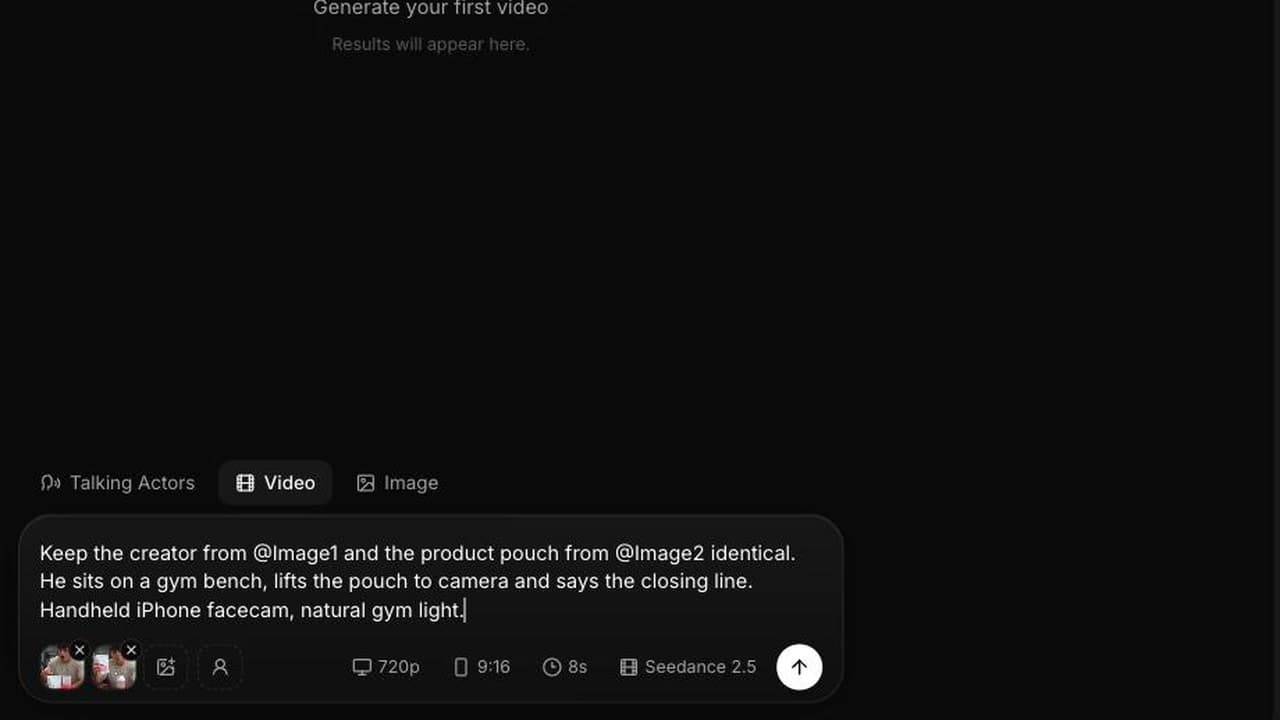
What an AI product video generator does with a photo you already have
The mode is decided by how many reference images you attach, and you do not pick it manually.
| Images attached | Mode | What you get |
|---|---|---|
| None | Text to video | The model invents the product. Fine for style tests, useless for selling |
| One | Image to video | Your image becomes the start frame and the shot moves from there |
| Two to four | Reference to video | Product, setting and subject carried across the shot, addressed as @Image1 to @Image4 |
Two practical consequences. First, in image to video the clip follows the aspect of the image you attach, so crop the source to the ratio you need before uploading; the aspect picker does not apply in that mode. Second, in reference to video you have to bind each image to a job in the prompt. Vague references get blended, and blended is how a bottle ends up wearing a hoodie.
One photo as the start frame
The single image workflow is the fastest thing in this post. Take the packshot you already have, attach it, and describe only the motion.
The camera pushes in slowly and orbits fifteen degrees to the left around
the bottle, which stays centred and in focus throughout. Soft studio light
travels across the glass as it turns. Nothing else in the frame moves. No
music, no voice. Ambient: a low room tone.
Rules that make this work: describe the move, not the product, because the product is already in front of the model. Keep the move small, because a large move forces the model to invent parts of the object it cannot see in the photo. And say what stays still, since an unconstrained prompt tends to animate the background and the label at the same time.
Image to video can also take an optional end frame, so the clip transitions from one image to another. That is the cheapest way to get a controlled before and after: attach the closed pack as the start and the open pack as the end, and let the model fill the four seconds in between. The full mechanics are in the Seedance 2.5 image to video guide.
Packshot plus lifestyle: two references, one shot
The single image approach inherits everything from your photo, including its background. When you want the product in a different setting, or in someone's hands, attach two images and bind them.
Keep the product exactly as in @Image1, same bottle shape, same label
colour, same matte finish. Use the kitchen from @Image2 as the setting,
same counter, same morning light. A hand enters frame, picks up the bottle
from the counter, turns it once toward camera and sets it down. Handheld,
50mm, shallow depth of field. Ambient: a kettle in the background, a
ceramic tap on stone. No music. 9:16.
Naming the attributes you care about, such as label colour and finish, is what keeps the product recognisable. "Keep the product from @Image1" is weaker than "same bottle shape, same label colour, same matte finish". You are giving the model a checklist to hold onto while it moves.
You can attach up to four references in this mode, which is enough for product, setting, creator and a style frame. Beyond three the instructions start competing, so add the fourth only when you can say clearly what it is for.
What holds up and what does not
Being straight about this saves you credits. In our runs, these hold up well:
- Product silhouette, proportion and colour, when the packshot is sharp and well lit.
- Materials: matte plastic, glass, brushed metal, fabric texture.
- Motion around the object: orbits, push ins, hands entering frame, liquid pouring.
- Setting continuity when the room comes from a reference image rather than a description.
These do not, and no amount of prompting fixes them:
- Fine text on labels. Ingredient lists, dosage panels, legal lines and small type will smear or turn into label shaped noise. Keep them out of macro focus.
- Complex logos. Wordmarks with tight letterforms, gradients or icons rarely survive a move. A simple bold mark held at a distance is a different story.
- Exact numbers and units. If the pack says 500ml, do not build a shot that depends on the viewer reading 500ml.
- Multi item sets where each item has different branding. The model averages them.
The practical workaround is the same one film production uses: hold the pack far enough from the lens that the label reads as a shape, then cut to a still frame you control for anything the customer has to read. Product claims, sizes and pricing belong on a card, not in the generated footage. Shopify's guidance on product media is a reasonable baseline for what has to be legible on a product page.
AI product video generator settings by placement
The cuts a store actually needs are not one video, they are four, and they have different specifications.
| Cut | Length | Ratio | Resolution | Credits |
|---|---|---|---|---|
| Product page hero loop | 4s | 1:1 or 4:3 | 720p | 192 |
| Product page detail | 4s | 1:1 | 720p | 192 |
| Paid social ad | 8s | 9:16 | 720p | 384 |
| Organic social post | 12s | 9:16 | 720p | 576 |
Seedance 2.5 bills 23 credits per second at 480p and 48 credits per second at 720p, and one credit is one cent of generation cost. So the full set above is 1,344 credits, about $13.44 of plan credit, per product. Rehearse each one at 480p first and the rehearsal round costs 644 credits for all four.
Notes per cut. The hero loop should have no speech at all, because product pages autoplay muted and a talking clip on a page is jarring. The detail cut is where a macro move earns its place, as long as it is not moving across text. The paid social cut is the only one that needs a spoken hook, and the writing for it is different enough that it is worth reading the product ad prompt library before you start. The organic cut can carry a longer beat and a second angle.
Where this fits in a store's workflow
Photography still comes first. This model multiplies assets you already have; it does not replace a photographer for a product nobody has shot yet. The realistic sequence is: shoot once, generate the four cuts above per product, then regenerate only the paid social cut when creative fatigue sets in, since that is the one that burns out.
For the broader picture of what belongs on a product page versus in an ad, the ecommerce product video guide is the longer read, and the earlier Seedance 2.0 ecommerce workflow still holds for structure. If you are testing many products rather than deepening one catalogue, the economics change and the dropshipping ads playbook covers that case. For paid placement specs, Meta for Business and TikTok for Business publish current requirements.
Frequently Asked Questions
Can I turn a single product photo into a video?
Yes. Attach one image and Seedance 2.5 treats it as the start frame, animating from there, which is the fastest way to get motion out of a packshot you already own. Describe the camera move and say what should stay still, rather than describing the product, since the model can already see it. The clip follows the aspect of the image you attached, so crop before you upload.
How do I keep my actual product in the shot instead of a lookalike?
Attach the product photo as a reference and bind it explicitly in the prompt: keep the product exactly as in @Image1, same shape, same label colour, same finish. Attaching two to four images puts the generation into reference to video mode, where images are addressed as @Image1 through @Image4. Naming specific attributes works better than a general instruction to keep the product.
Will the text on my product label be readable?
Assume it will not. Fine text, ingredient panels and complex logos are the weakest part of generated video and they smear when the object moves. Shoot the generated cut so the label reads as a shape rather than as copy, and put anything the customer has to read on a still card or in the page copy instead.
What resolution should ecommerce product videos be?
Generate at 720p for anything that goes on a product page or into a paid ad, and use 480p for rehearsals. At 48 credits per second, a 4 second product page loop costs 192 credits at 720p, while the same rehearsal at 480p costs 92. Resolution is the last thing worth paying for, after the move and the framing are right.
How many cuts do I need per product?
Four covers most stores: a 4 second hero loop and a 4 second detail cut for the product page, an 8 second vertical cut for paid social, and a 12 second vertical cut for organic. That set costs 1,344 credits at 720p, about $13.44 of plan credit per product, before rehearsals.
Should product page videos have sound?
The generated audio is always there, since sound effects, ambient sound and speech come out of the same pass and there is no audio toggle. For product page loops write "no music, no voice" and keep only a quiet ambient bed, because those players autoplay muted anyway. Save the spoken hook for the social and paid cuts, where sound is on.
Frequently Asked Questions
Share
AI Summary

Paul Grisel
Paul Grisel is the founder of VIDEOAI.ME, dedicated to empowering creators and entrepreneurs with innovative AI-powered video solutions.
@grsl_frReady to Create Professional AI Videos?
Join thousands of entrepreneurs and creators who use VIDEO AI ME to produce stunning videos in minutes, not hours.
- Create professional videos in under 5 minutes
- No video skills experience required, No camera needed
- Hyper-realistic actors that look and sound like real people
Get your first video in minutes
Related Articles
FLUX 3 Max Shopify Launch Videos From Product Photos
A launch-week video set for your Shopify store built from product photos with FLUX 3 Max image to video: seven assets, copy-paste prompts, credit costs and upload steps.
FLUX 3 Max Dropshipping Ads: Cost per Tested Angle
A dropshipping test depends on how many distinct angles you can afford to try. Here is what each tested angle costs with FLUX 3 Max, with copy-paste prompts and a weekly cycle.
AI Product Video With FLUX 3 Max: From Photo to Clip
How to turn the product photos you already have into short videos with sound for product pages and ads, using FLUX 3 Max image to video on VIDEO AI ME.