
Scaling Ad Creative With Seedance 2.5: Agency Guide
Volume math, reference image consistency, a cheap test and expensive finish workflow, and the disclosure paragraph to put in your statement of work.
Agencies do not have an idea problem, they have a throughput problem. Five clients, each expecting four to eight ad variants a month, each with a product and a spokesperson that have to look like themselves in every single frame. Seedance 2.5 is now live in the VIDEO AI ME editor, and it changes the arithmetic of AI video for agencies in one specific way: a single generation comes back with dialogue, ambient sound and colour grade already in it, so what you hand to the account manager is closer to a deliverable than to a raw asset that still needs three hours of post.
This post is the production side of that, not the marketing side. Volume math on a real plan, how to keep a client's product consistent across a batch, the two pass workflow that stops you burning credits on rejects, and what to put in writing when a client asks how the work was made.
What Seedance 2.5 changes for AI video for agencies
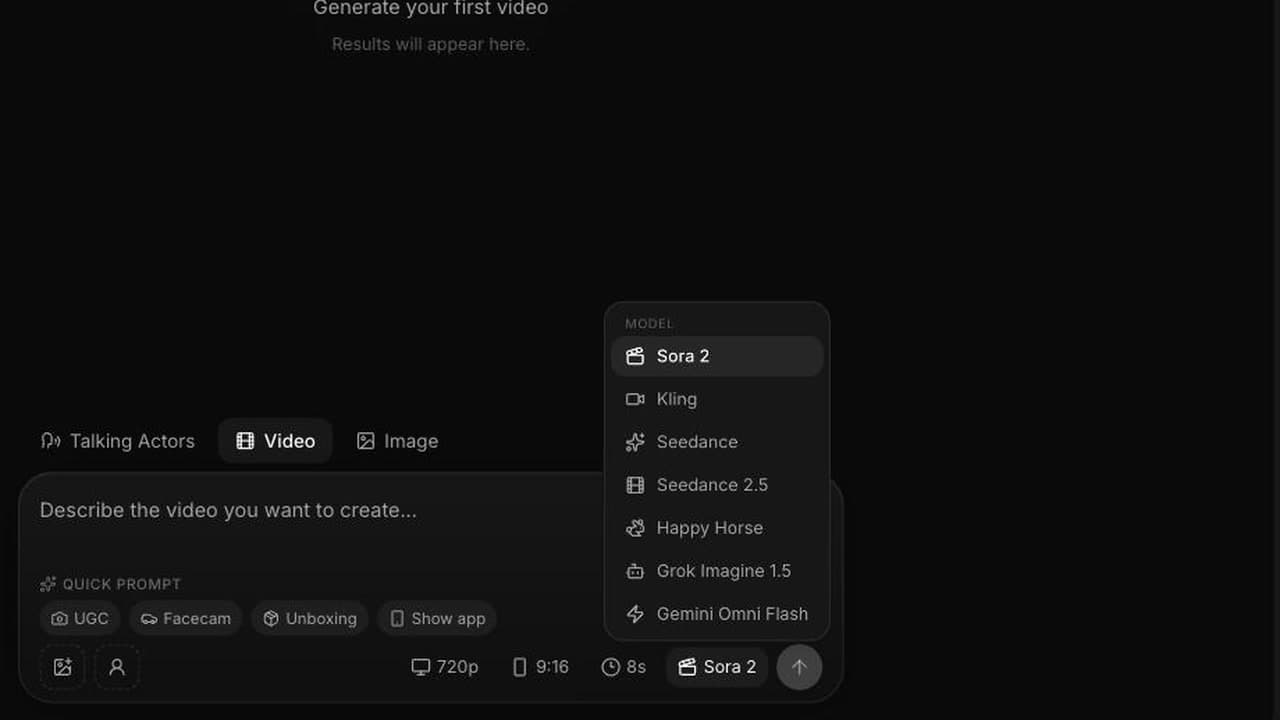
The model picker in the VIDEO AI ME editor now lists Seedance 2.5 next to Sora 2, Kling, Seedance 2.0 Fast, Happy Horse, Grok Imagine 1.5 and Gemini Omni Flash. Three things matter for agency work.
Audio is generated with the video and is included in the price. Sound effects, room tone and lip synced speech all come out of the same generation. There is no audio toggle and no surcharge. For a shop that has been paying for voiceover on every client cut, that is the line item that moves.
Durations go to 30 seconds in a single pass. The UI offers 4, 8, 12, 15, 20, 25 and 30 seconds, and a 30 second clip is generated as one continuous piece rather than stitched from shorter ones. A full length spot can therefore hold a story arc instead of a single moment.
Mode is chosen by how many reference images you attach. No images gives you text to video. One image gives you image to video, animating that frame. Two to four images gives you reference to video, where you address each image in the prompt as @Image1 through @Image4 and the model carries those subjects, products and styles through the shot. The Seedance 2.5 model as ByteDance describes it also accepts video and audio references and larger reference sets. On VIDEO AI ME today you get text to video, image to video, and reference to video with up to four images.
Resolutions are 480p and 720p. Aspect ratios are auto, 21:9, 16:9, 4:3, 1:1, 3:4 and 9:16, except in image to video where the output follows the input image. Everything runs in English, in a browser, on a normal subscription.
How much AI video for agencies does a plan actually buy?
Credits are the billing unit and one credit equals one cent of generation cost. Seedance 2.5 costs 23 credits per second at 480p and 48 credits per second at 720p. Reference to video costs the same per second as the other modes, which is the number most people get wrong when they budget.
| Plan | Price | Monthly credits | 720p seconds | 480p seconds |
|---|---|---|---|---|
| Starter | $29/mo | 1,400 | about 29 | about 60 |
| Pro | $99/mo | 5,600 | about 116 | about 243 |
| Premium | $199/mo | 12,000 | about 250 | about 521 |
Seconds are abstract, finished spots are not. On Premium, 12,000 credits buys 31 finished eight second spots at 720p, because an eight second 720p generation costs 384 credits. The same allowance buys 65 eight second spots at 480p, or 16 fifteen second spots at 720p. Pro buys 14 eight second 720p spots or 30 at 480p.
Read that as client capacity. Five clients on Premium, each getting six finished 720p cuts a month, uses 11,520 of the 12,000 credits with a little room for a reshoot. Three clients each getting ten cuts fits the same envelope. If your retainers promise more than about thirty finished 720p spots a month across the whole book, you are looking at more than one seat or a heavier mix of 480p social cuts. Our Seedance 2.5 pricing breakdown has the per duration table if you need to quote a specific package, and the current plan tiers are on the VIDEO AI ME pricing page.
One caveat that catches agencies out on the smallest plan: a full 30 second clip at 720p costs 1,440 credits, which is more than the entire Starter monthly allowance of 1,400. Thirty second 720p work starts at Pro. Starter handles 30 second clips at 480p, at 690 credits, comfortably.
Keeping one client's product and spokesperson consistent across a batch
This is the part that separates a batch from a pile. A client does not want six good videos, they want six videos that look like the same campaign.
Build a reference kit per client before you generate anything. Three or four locked images: one clean product shot on white, one product in context, one portrait of the spokesperson you intend to reuse, and if the brand is strict, one frame that carries the palette. Store them with the client's brand folder and use the identical files across the whole batch. Different source crops of the same product will drift.
Then bind them explicitly in the prompt. Vague references get blended, and blended is how a serum bottle grows a second cap. Write "keep the woman from @Image1, same face, same hair, same jacket" and "the bottle from @Image2, same label layout and same cap colour" rather than "using the references". Naming which attribute comes from which image is the single highest leverage habit in reference to video. The full mechanics are in our guide to Seedance 2.5 reference images.
A few practical rules from batch work. Keep the spokesperson's wardrobe fixed across a batch unless a variant is explicitly about wardrobe, because clothing changes read as different people at thumbnail size. Vary setting and dialogue rather than identity when you want variants. Re-attach the same reference images for every generation in the batch rather than continuing from an earlier output, since each generation is independent. And check the product in the last frame, not the first, because drift accumulates through the shot.
The cheap test, expensive finish workflow
Do not generate concepts at delivery resolution. Test at 480p, finish at 720p.
The math is plain. Four eight second variants at 480p cost 184 credits each, so 736 credits to see four different takes on a concept. Finishing the winner at 720p costs another 384. Total for a validated, delivered eight second spot: 1,120 credits. Generating all four variants at 720p instead costs 1,536. You save 416 credits per concept, about 27 percent, and on ten concepts a month that is 4,160 credits, roughly a third of a Premium allowance recovered.
The saving compounds when a concept fails, which is the normal case. A concept that dies after two takes has cost you 368 credits at 480p instead of 768 at 720p, and nobody had to defend the spend in a status meeting.
At 480p you can already judge everything that actually kills a take: whether the performance is believable, whether the dialogue timing works, whether the product survives the camera move, whether the hook lands in the first second. What you cannot judge is fine detail and text legibility, which is exactly what 720p is for.
Two habits make this stick. Keep the prompt byte identical between the test and the finish, changing only the resolution, so you are finishing the take you approved rather than a new roll of the dice. And put the 480p variants in front of the client, not the 720p one. Clients choose faster from four rough options than from one polished option, and you have not yet spent the delivery credits.
What to tell a client about how the work is made
Say it in the statement of work, before the invoice, in one paragraph. Something like: creative for this campaign is produced with generative video tools, no crew or shoot is involved, the spokesperson is generated rather than a hired talent, and no real customer is depicted or quoted.
Three reasons that paragraph protects you. First, a client who learns it from a comment thread reacts very differently to a client who read it in a contract. Second, a generated spokesperson saying "this fixed my skin" functions as a testimonial, and the FTC Endorsement Guides are clear that an endorsement is supposed to reflect the honest opinion of a real endorser. Write generated dialogue as brand voice, demonstration or dramatisation, not as a customer verdict, and never attach a fabricated name or result to it. Third, the ad platforms publish their own rules for disclosing realistic AI generated or digitally altered content, so read the current Meta advertising policies and the TikTok for Business guidance before a campaign launches rather than after a rejection.
There is also a positioning question. Some agencies bury the method and some lead with it. Neither is wrong, but pick one per client and keep it consistent, because the worst outcome is a brand that discovers its own production method from an audience member. For the wider service model, white labelling, retainer shape and how to package this as a line of business, our post on scaling client creative as a white label service goes deeper, and the earlier Seedance 2.0 agency workflow still holds for the parts that are not model specific.
A batch process that survives contact with clients
Put the pieces in order and it becomes routine. Lock the client reference kit once per quarter. Write the concept list for the month, six to ten lines, each one a full sentence describing a shot rather than a topic. Generate every concept at 480p, eight seconds, in one sitting. Send the whole sheet to the client with numbers. Take the approvals, regenerate only those at 720p with an unchanged prompt, and deliver.
The failure mode to watch for is not quality, it is sprawl. Agencies that lose money on this generate forty variants nobody asked for. Decide the number of finished assets per client before you open the editor and let the credit budget hold you to it.
Frequently Asked Questions
How much video can an agency produce with Seedance 2.5 on the Premium plan?
Premium gives you 12,000 credits a month, which is about 250 seconds of 720p or about 521 seconds of 480p. In finished assets that is roughly 31 eight second spots at 720p, 16 fifteen second spots at 720p, or 65 eight second spots at 480p.
Can I keep a client's product and spokesperson consistent across a batch of ads?
Yes, using reference to video. Attach two to four locked reference images and bind them explicitly in the prompt, for example "keep the woman from @Image1" and "the bottle from @Image2, same label and cap colour". Re-attach the identical files for every generation in the batch rather than continuing from a previous output.
Should client work be rendered at 480p or 720p?
Test at 480p and finish at 720p. At 480p you can judge performance, dialogue timing and whether the hook lands, and it costs 23 credits per second instead of 48. Render only the approved take at 720p, keeping the prompt unchanged.
Does reference to video cost more than text to video?
No. All three modes cost the same per second, 23 credits at 480p and 48 credits at 720p. Attaching reference images changes the mode, not the price.
Do agencies have to tell clients that the ads are AI generated?
Put it in the statement of work as a matter of practice. Generated dialogue should be written as brand voice or dramatisation rather than as a customer testimonial, and both Meta and TikTok publish their own rules on disclosing realistic AI generated content, so check the current policy before a campaign launches.
Which plan should an agency start on?
Pro at $99 a month for a single client or a pilot, Premium at $199 a month once you are producing for three or more clients. Starter at $29 a month is too tight for agency batches, since its 1,400 credit allowance will not even cover one 30 second clip at 720p.
Frequently Asked Questions
Share
AI Summary

Paul Grisel
Paul Grisel is the founder of VIDEOAI.ME, dedicated to empowering creators and entrepreneurs with innovative AI-powered video solutions.
@grsl_frReady to Create Professional AI Videos?
Join thousands of entrepreneurs and creators who use VIDEO AI ME to produce stunning videos in minutes, not hours.
- Create professional videos in under 5 minutes
- No video skills experience required, No camera needed
- Hyper-realistic actors that look and sound like real people
Get your first video in minutes
Related Articles
FLUX 3 Max Cinematic Video: 21:9 Brand Films at 1080p
How to shoot a cinematic brand film with FLUX 3 Max: 21:9 at 1080p, 20 second single takes, camera language, sound design, copy-paste prompts and a cost table per shot.
FLUX 3 Max Meta Ads: A Creative Testing Workflow
How to feed a Meta creative test with distinct FLUX 3 Max variants: credit budgets per asset, 720p drafts, 1080p winners, placement ratios and one-variable prompts.
FLUX 3 Max for Agencies: Client Volume and Cost per Ad
How agencies can price, draft and deliver client video with FLUX 3 Max: cost per deliverable, the 720p draft and 1080p final workflow, and keeping a batch on brand.