
Use Seedance 2.5 Without Jimeng or Doubao
ByteDance shipped Seedance 2.5 inside Jimeng AI and Doubao, which most buyers outside China cannot register for. Here is what that means in practice and the browser route that works today.
If you searched for Seedance 2.5 and every answer pointed at Jimeng or Doubao, you already found the problem. ByteDance released the model on 2026-07-31 inside those two consumer apps, and for most buyers outside China that is a closed door rather than a download link. This post explains the situation plainly, without drama, and then shows the route that works from a browser in English today.
None of what follows is a complaint about ByteDance. Jimeng AI and Doubao are products built for the domestic Chinese market, and shipping a new model there first is a reasonable decision. It just means the distribution and the demand are currently in different places.
Where Seedance 2.5 actually shipped
Three facts, and they are the whole picture:
- The launch surfaces were Jimeng AI and Doubao. Both are ByteDance consumer applications. The model details are published on the ByteDance Seed site.
- API access was announced as coming later through BytePlus ModelArk, the enterprise platform. Later is the only timing anyone has stated, so treat any specific date you read elsewhere as a guess.
- No Western consumer surface was part of the launch. There was no app store release for other regions and no English web product on day one.
That combination produced a large and specific search pattern: people looking for how to reach the model, not people looking for a review.
What blocks most buyers from Jimeng and Doubao
Two practical obstacles, and neither is fixed by trying harder.
Registration. Both apps are built around a Chinese consumer identity. In practice that means a Chinese phone number for sign up and verification. If you do not have one, you do not have an account, and no amount of network configuration changes that. A VPN moves your apparent location, which is not the field the sign up form is stuck on.
Language. The interfaces are in Chinese. Machine translating a video editor is workable for a curious hobbyist and unworkable for a team that has to hit a client deadline. Prompt fields, duration menus and error messages all matter when you are iterating twenty times on a spot.
There is a third obstacle that is easy to underestimate: process. Agencies and ecommerce teams work inside review flows, brand approvals and shared asset libraries. A tool that only one person can technically log into does not survive contact with a production schedule, even when that person is willing.
How to use Seedance 2.5 without Jimeng or Doubao
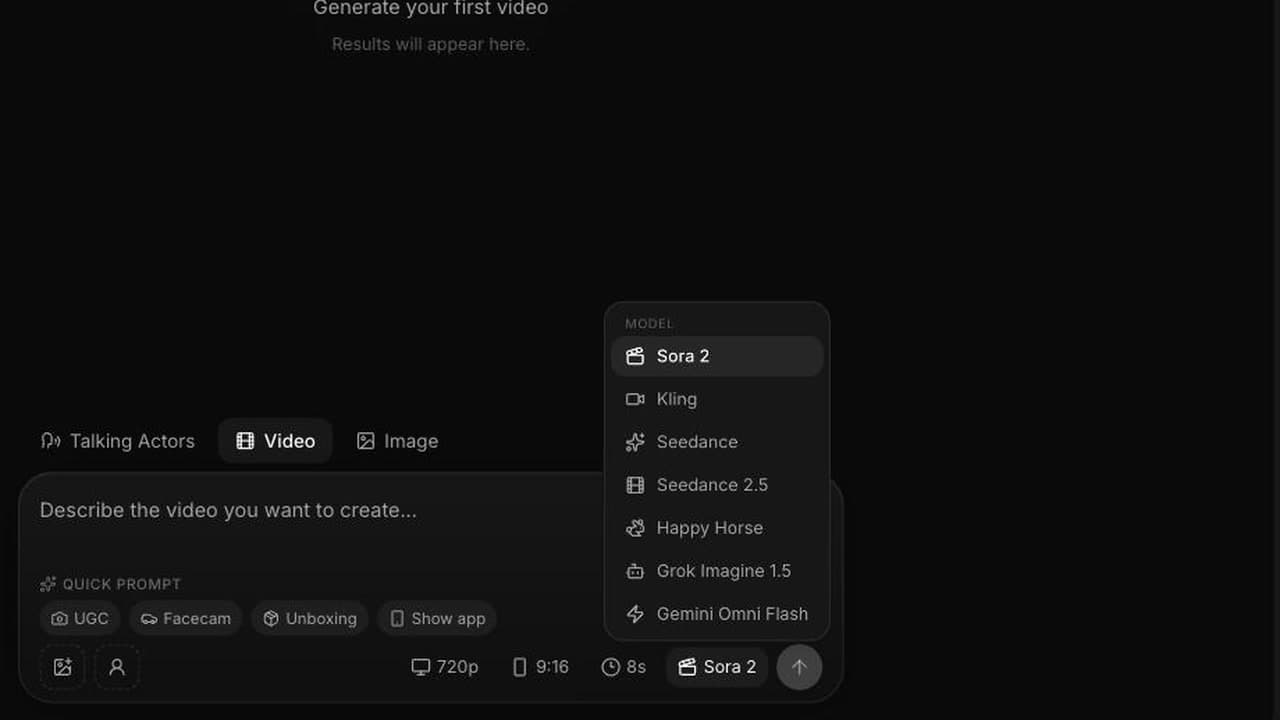
The browser route is short. Seedance 2.5 is selectable in the VIDEO AI ME model picker in the /new editor, alongside Sora 2, Kling, Seedance 2.0 Fast, Happy Horse, Grok Imagine 1.5 and Gemini Omni Flash.
- Sign in on videoai.me and open the /new editor.
- Open the model dropdown and choose Seedance 2.5.
- Write your prompt in English, describing the shot as one continuous action rather than a list of keywords.
- Set duration, resolution and aspect ratio.
- Attach reference images only if a specific face, product or style has to survive the render.
- Generate, and review the result with the sound on.
That is it. No phone number, no app install, no invite code, no translated interface. The full step by step walkthrough covers each of those with the settings we recommend for a first run, and the launch notes for Seedance 2.5 on VIDEO AI ME list exactly what shipped.
What you get on this route, precisely
Being exact here matters more than being enthusiastic, because the launch coverage describes model capabilities that are not the same thing as product features.
What is available in the editor today:
| Reference images attached | Mode | What it does |
|---|---|---|
| 0 | Text to video | Prompt only |
| 1 | Image to video | Animates that image as the start frame |
| 2 to 4 | Reference to video | Carries subjects, product and style across the shot, addressed as @Image1 through @Image4 |
Plus:
- Durations of 4, 8, 12, 15, 20, 25 and 30 seconds, with 30 seconds produced in a single pass rather than stitched from shorter clips.
- 480p and 720p.
- Aspect ratios auto, 21:9, 16:9, 4:3, 1:1, 3:4 and 9:16, except in image to video where the output follows the input image.
- Audio generated in the same render and included in the price: sound effects, ambient sound and lip synced speech. No toggle, no surcharge.
And the honest boundary: the Seedance 2.5 model also accepts video references and audio references and a larger set of reference images than four, along with editing controls that work on specific timestamps. Those are properties of the model, not things you can do in the editor today. Plan around the table above.
What this route costs
Credits are the billing unit and 1 credit equals 1 cent of generation cost. Seedance 2.5 is 23 credits per second at 480p and 48 credits per second at 720p, and reference to video costs the same per second as the other modes.
| Clip length | 480p | 720p |
|---|---|---|
| 8 seconds | 184 credits | 384 credits |
| 15 seconds | 345 credits | 720 credits |
| 30 seconds | 690 credits | 1,440 credits |
| Plan | Price | Monthly credits |
|---|---|---|
| Starter | $29/mo | 1,400 |
| Pro | $99/mo | 5,600 |
| Premium | $199/mo | 12,000 |
One number worth internalising before you plan a campaign: a 30 second clip at 720p costs 1,440 credits, which is more than the whole Starter allowance of 1,400 per month. Thirty second delivery at 720p starts at Pro. Starter runs 30 second clips at 480p at 690 credits each without difficulty. Current plan details are on the pricing page. There is no free tier for video generation, so an active subscription is required.
A first session that tells you whether this is worth it
Do not spend the first session exploring. Spend it reproducing something you already have, because that gives you a standard to judge against.
Minute 0 to 5. Pick an ad you currently run. Write its opening shot as one continuous description: camera move, subject and action, grade, style anchor. Add the spoken line in quotation marks and name the ambient sound.
Minute 5 to 10. Generate at 8 seconds, 480p, 9:16. That costs 184 credits. Watch it with sound on and note only the biggest single failure.
Minute 10 to 20. Fix that one thing, re-run, then extend to 15 seconds once the shot is right. Total spend to this point is under 750 credits, and you now know whether the model does what your creative needs.
If the answer is yes, the 720p delivery render is the last step, not the first. This is the same discipline that keeps cost per usable asset low regardless of which model you use.
Where the API question fits
If you came looking for the model because you wanted to wire it into a pipeline rather than sit in an editor, the access story is different from the creative story, and the honest answer involves waiting. We wrote that up separately in the state of Seedance 2.5 API access, including which workloads genuinely need an API and which ones do not.
If the reason you are here is language rather than accounts, the companion post on running Seedance 2.5 in English covers the interface, English prompting and English spoken output.
Frequently Asked Questions
Is Seedance 2.5 only available inside Jimeng and Doubao?
That is where ByteDance shipped it on 2026-07-31, and API access was announced as arriving later through BytePlus ModelArk. It is also selectable in the VIDEO AI ME model picker, which runs in a browser in English, so those apps are not the only route to the model.
Do I need a Chinese phone number to use Seedance 2.5?
Not through a browser based product. Jimeng and Doubao are consumer apps built for the domestic Chinese market, so registration in practice expects a Chinese phone number and the interface is in Chinese. On videoai.me you sign in with a normal account and select the model from a dropdown.
Would a VPN get me into Jimeng or Doubao?
The obstacle is account registration and interface language rather than geography, so a VPN does not address the part that actually blocks you. We do not recommend working around another company terms of service. Using the model through a product that serves your region is simpler and supported.
Is the Seedance 2.5 on VIDEO AI ME the same model?
It is Seedance 2.5. What differs is the interface around it and which capabilities are exposed. On VIDEO AI ME you get text to video, image to video, and reference to video with up to four images, at 4 to 30 seconds, 480p or 720p, with audio generated in the same pass.
What does it cost to use Seedance 2.5 this way?
Generation is billed in credits, where 1 credit equals 1 cent of generation cost. Seedance 2.5 is 23 credits per second at 480p and 48 credits per second at 720p. Plans start at Starter $29/mo for 1,400 credits, then Pro $99/mo for 5,600 and Premium $199/mo for 12,000.
Do I need to install an app or join a waitlist?
No. Seedance 2.5 runs in the browser in the /new editor on an active subscription. There is no download, no waitlist and no invite code. Video generation does require a paid plan, since there is no free tier for generation.
Frequently Asked Questions
Share
AI Summary

Paul Grisel
Paul Grisel is the founder of VIDEOAI.ME, dedicated to empowering creators and entrepreneurs with innovative AI-powered video solutions.
@grsl_frReady to Create Professional AI Videos?
Join thousands of entrepreneurs and creators who use VIDEO AI ME to produce stunning videos in minutes, not hours.
- Create professional videos in under 5 minutes
- No video skills experience required, No camera needed
- Hyper-realistic actors that look and sound like real people
Get your first video in minutes
Related Articles
FLUX 3 Max Audio: Sound and Dialogue Prompt Guide
FLUX 3 Max generates sound on every clip. How to write dialogue it will speak, direct ambience and effects, decide on music, and replace the track when you need to.
FLUX 3 Max Aspect Ratios and Durations Explained
Every FLUX 3 Max aspect ratio and clip length on VIDEO AI ME, how auto behaves in each mode, which placement wants which shape, and what each duration costs.
FLUX 3 Max 1080p vs 720p: When 1080p Is Worth It
FLUX 3 Max costs 17 credits per second at 720p and 29 at 1080p. When the higher tier earns its rate, when 720p is enough, and how to test cheap and deliver sharp.