
Seedance 2.5 in English: How to Use It Today
English interface, English prompts and English spoken output. What each one means in practice when you generate Seedance 2.5 ads, and how to write dialogue the model can actually perform.
People search for Seedance 2.5 in English for three different reasons, and they need three different answers. Some want an interface they can read. Some want to know whether English prompts work as well as the examples circulating in Chinese. Some want the model to speak English out loud, because the audio is generated with the picture and their ad has a talking spokesperson in it. This post covers all three, in that order.
The short version: the model is in the VIDEO AI ME editor, the whole interface is English, you write your prompts in English, and a line you put in quotation marks comes back spoken and lip synced. ByteDance publishes the model details on the ByteDance Seed site, but the working surface for an English speaking team is a browser.
Seedance 2.5 in English, part one: the interface
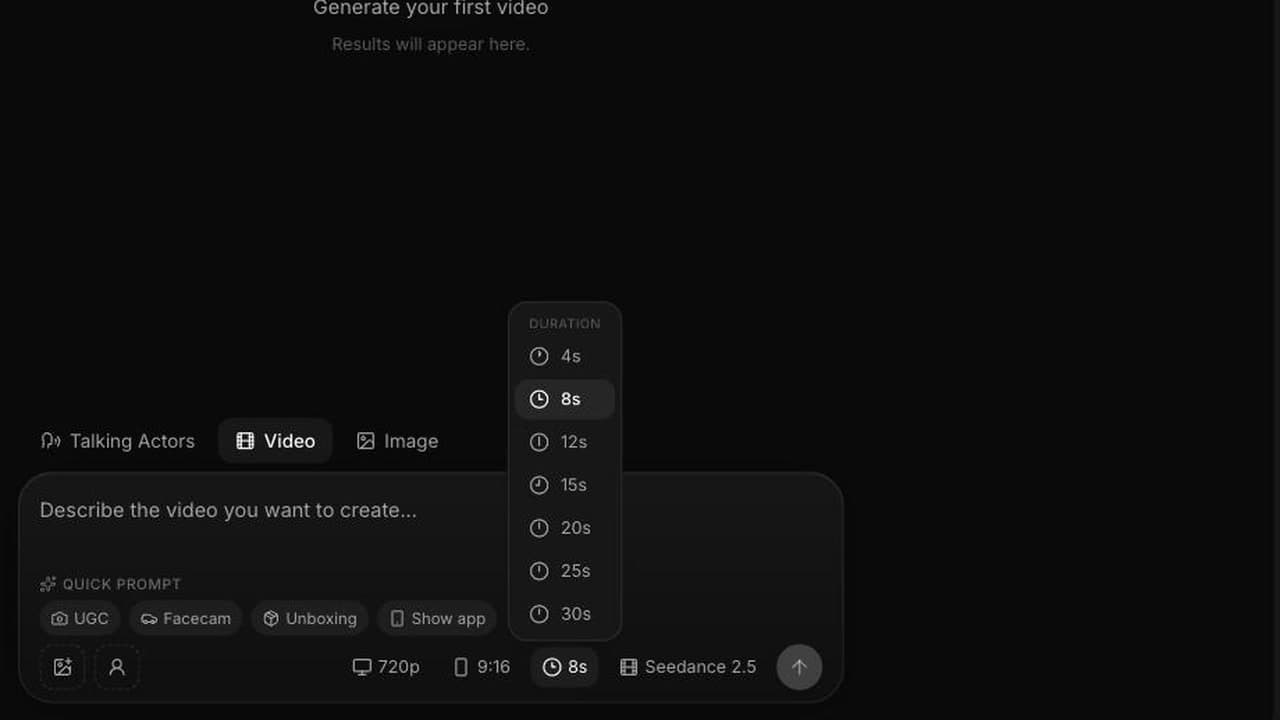
Every control you touch is in English and there is nothing to translate. The model dropdown lists Seedance 2.5 next to Sora 2, Kling, Seedance 2.0 Fast, Happy Horse, Grok Imagine 1.5 and Gemini Omni Flash. The settings are a short list:
- Duration: 4, 8, 12, 15, 20, 25 or 30 seconds, with 30 seconds produced in a single pass rather than stitched from shorter clips.
- Resolution: 480p or 720p.
- Aspect ratio: auto, 21:9, 16:9, 4:3, 1:1, 3:4 or 9:16. In image to video the output follows the input image, so the picker does not apply there.
- Reference images: none gives text to video, one gives image to video, two to four gives reference to video with @Image1 through @Image4.
That is the entire control surface. Nothing is hidden behind an untranslated menu, which matters more than it sounds when you are on your fifteenth iteration of a client spot at 6pm.
Worth stating precisely: the Seedance 2.5 model also handles video references, audio references and editing that targets specific timestamps. Those are model level capabilities and not part of the editor today. What you get in English today is the list above.
Seedance 2.5 in English, part two: writing the prompt
English prompting for this model is closer to writing a shot description than to writing search keywords. The model reasons about the whole shot at once, so a comma separated stack of adjectives produces a stack of adjectives.
Four ingredients, in plain English:
Camera. Shot size, movement, angle, lens feel. "Slow push in on a medium close up, handheld, slight sway." Cinematography vocabulary works, and it works better than adjectives like "cinematic" on their own.
Subject and action, with a beginning and an end. Not "woman, kitchen, product" but "a woman opens the fridge, takes out the bottle, turns to camera and reads the label out loud." Give the shot somewhere to go.
Grade. "Golden hour, teal and orange, rich blacks, gentle halation" tells the render what the image should feel like far more reliably than "beautiful".
Style anchor. "Epic luxury commercial style, photoreal" or "handheld phone footage, slightly overexposed, no colour grade" sets the register.
Here is the opening shot of the 15 second reference spot we publish, written exactly this way:
Aerial drone orbit, 45 degree down angle, slowly descending, counter clockwise. A woman in a flowing crimson silk gown walks barefoot on the surface of a mirror calm ocean at golden hour, toward a low molten sun. Slow concentric ripples radiate from each step. Slow motion, anamorphic lens flare, teal and orange cinematic grade, rich blacks, gentle halation. Epic luxury commercial style, 16:9, photoreal.
For longer generations, English helps you in a way keyword lists cannot: you can write an arc. For a 20 or 30 second clip, write setup, then development, then a turn, then a resolution, and name the transitions between them. The Seedance 2.5 prompt guide has more structures like this, and the six step walkthrough puts them in the order you use them.
Seedance 2.5 in English, part three: spoken output
This is the part that changes how you write. Audio is generated with the picture and always included in the price: sound effects, ambient sound and lip synced speech. So your prompt has a soundtrack whether you wrote one or not.
Put the line in quotation marks. She says "They spent two million dollars on this ad." Write it exactly as it should be heard, including contractions, because the model performs what you wrote rather than a tidied version of it.
Budget the length against the duration. Read the line aloud with a timer. A rough working guide is two to three words per second at natural pace, and you want a beat of air at the start and the end of the clip. In practice, one short sentence per 8 seconds, two short sentences per 15 seconds. Overwriting the line is the single most common cause of dialogue that sounds hurried.
Name the delivery. "Says warmly, slightly amused" or "flat, matter of fact, no smile" changes the read. Delivery notes are cheap and they land.
Name the ambient sound, including its absence. Distant surf. Quiet office room tone. If you do not want music, say there is no music, because otherwise you may get a bed you then have to work around in the edit.
One speaker per shot. Two people trading lines inside a single generation is asking a lot of a single pass. Split the exchange into two clips and cut them together.
A note on brand names and product names: check them on the first render with the sound on, and if a name comes back mispronounced, try writing it phonetically in the quoted line. For any wording that must be legible and exact, we place it as an overlay in the edit rather than asking the render to produce it.
What to check on your first English render
Watch it once with sound on and score four things in this order:
- Does the line land where the picture wants it to land?
- Is the mouth movement convincing during the line?
- Is there unwanted music or an ambient bed that fights the read?
- Does the pacing match the duration you chose, with no dead air at the tail?
Only then look at grade and detail. Reviewing in this order stops you re-rendering four times over a colour note while the dialogue timing is still wrong.
What an English dialogue test costs
Credits are the billing unit and 1 credit equals 1 cent of generation cost. Seedance 2.5 is 23 credits per second at 480p and 48 credits per second at 720p.
A realistic dialogue development loop:
- 8 seconds at 480p to test the line and the delivery: 184 credits.
- A second 8 second pass at 480p after shortening the line: 184 credits.
- 15 seconds at 480p once the full script fits: 345 credits.
- 15 seconds at 720p as the delivery render: 720 credits.
That is 1,433 credits, about $14.33 of plan credit, for a spoken 15 second spot with three learning passes behind it. Plans are Starter at $29/mo with 1,400 credits, Pro at $99/mo with 5,600 and Premium at $199/mo with 12,000. Note that a 30 second clip at 720p is 1,440 credits on its own, more than the full Starter allowance, so 30 second delivery at 720p starts at Pro.
Where English dialogue pays off most
Spokesperson and testimonial creative, because that is where a separate voiceover step used to cost you a day per round of revisions. If that is the format you run on Meta or TikTok, generating the line and the lip sync in the same pass compresses the revision cycle to minutes. Our AI UGC generator page covers that workflow end to end, and the deep dive on Seedance 2.5 video with sound covers the audio side in more depth.
If your blocker was account access rather than language, the companion post on using Seedance 2.5 without Jimeng or Doubao covers that instead.
Frequently Asked Questions
Is Seedance 2.5 available in English?
Yes, through the VIDEO AI ME editor. The model picker, the prompt field, the duration and resolution controls and the rendered clips are all in English, and it runs in a browser on an active subscription rather than in a translated app interface.
Do I have to write Seedance 2.5 prompts in English?
English prompts are what our guidance and examples are built around, and they are what we test with. Write the shot as one continuous English description, and put any line that should be spoken inside quotation marks exactly as you want it heard.
Does Seedance 2.5 actually speak English out loud?
Audio is generated with the picture and includes lip synced speech, so a line written in quotation marks in your prompt comes back performed in the clip. There is no separate text to speech step, no audio toggle and no audio surcharge.
How many words of English dialogue fit in an 8 second clip?
Read the line out loud at natural pace with a timer. As a rough guide, budget two to three words per second and leave room at the head and tail of the clip, so an 8 second spot comfortably carries a short sentence rather than a paragraph.
Can I produce the same ad in another language?
Write the spoken line in the language you want heard and render again. The 15 second reference spot we publish ends on a montage of the same actor in different looks and languages, produced that way. Each render is billed separately at the same per second rate.
Why does my English dialogue sound rushed?
Almost always the line is too long for the duration you selected. Either shorten the line or step the duration up from 8 to 12 or 15 seconds. Cramming a full sentence into a 4 second clip forces the delivery to compress and the result reads as unnatural.
Frequently Asked Questions
Share
AI Summary

Paul Grisel
Paul Grisel is the founder of VIDEOAI.ME, dedicated to empowering creators and entrepreneurs with innovative AI-powered video solutions.
@grsl_frReady to Create Professional AI Videos?
Join thousands of entrepreneurs and creators who use VIDEO AI ME to produce stunning videos in minutes, not hours.
- Create professional videos in under 5 minutes
- No video skills experience required, No camera needed
- Hyper-realistic actors that look and sound like real people
Get your first video in minutes
Related Articles
FLUX 3 Max Audio: Sound and Dialogue Prompt Guide
FLUX 3 Max generates sound on every clip. How to write dialogue it will speak, direct ambience and effects, decide on music, and replace the track when you need to.
FLUX 3 Max Aspect Ratios and Durations Explained
Every FLUX 3 Max aspect ratio and clip length on VIDEO AI ME, how auto behaves in each mode, which placement wants which shape, and what each duration costs.
FLUX 3 Max 1080p vs 720p: When 1080p Is Worth It
FLUX 3 Max costs 17 credits per second at 720p and 29 at 1080p. When the higher tier earns its rate, when 720p is enough, and how to test cheap and deliver sharp.